






If you’ve been building a WordPress site for any length of time, you’ve encountered the Categories and Tags panels. They look similar, they both help organize content, and honestly? Most beginners use them interchangeably. If you’re wondering whether WordPress categories or tags are better for SEO, you’re not alone. Many site owners struggle to understand the real difference between categories vs tags and how each impacts search rankings, crawlability, and site structure. In this guide, you’ll learn exactly how to use categories and tags properly for SEO — without creating duplicate content or thin archive pages.
This guide is part of our structured WordPress training roadmap. If you’re serious about mastering WordPress step-by-step — from beginner basics to advanced optimization — follow our complete learning path here: Complete WordPress Tutorial: Beginners to Experts.
And if you haven’t yet explored how WordPress handles permissions and access control, we recommend reading this first: WordPress User Roles Explained: Complete Guide to Roles & Permissions. Understanding roles helps you manage content safely before organizing it with categories and tags.
Big mistake.
Here’s the truth: Using categories and tags incorrectly can confuse your readers, create duplicate content issues, and dilute your SEO efforts. But when used strategically, they become powerful tools that:
-
Help Google understand your site structure
-
Improve user experience
-
Boost your chances of ranking in featured snippets
-
Create logical internal linking networks
In this comprehensive guide, I’ll walk you through everything you need to know about WordPress categories vs tags from an SEO perspective. No fluff, no theory—just actionable best practices you can implement today.
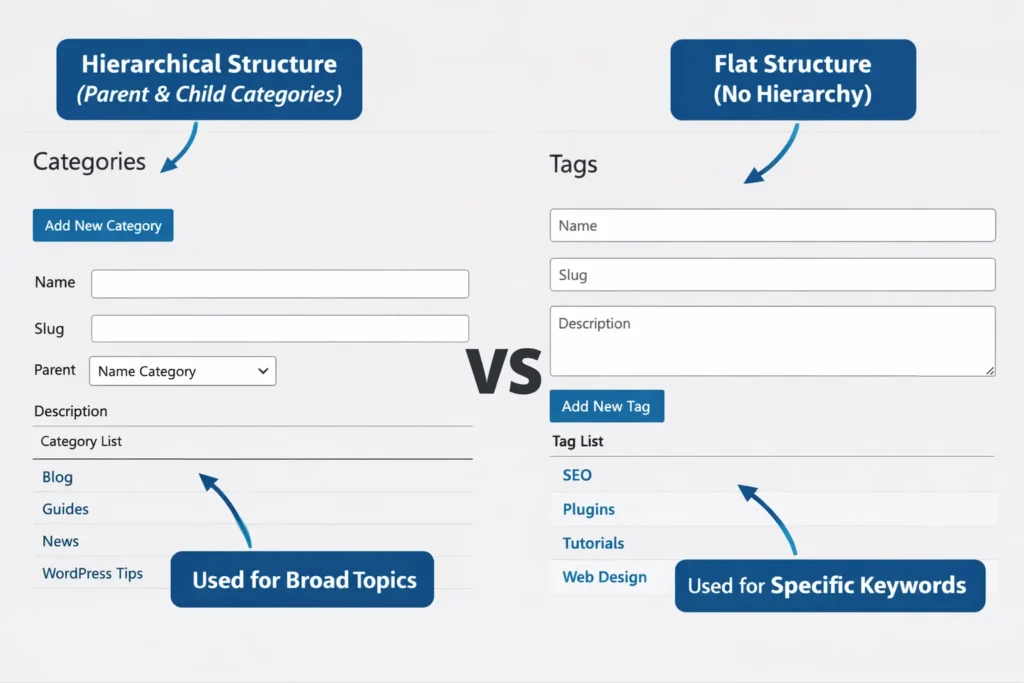
Categories vs Tags for SEO – Quick Answer
- Categories are better for building topic authority and site structure.
- Tags help connect related posts and target long-tail keywords.
- Categories should be limited (5–10 core topics).
- Tags should be used consistently and never created randomly.
- For most websites, categories should be indexed, while low-value tag archives can be noindexed.
In short: Categories build structure and authority. Tags enhance specificity and internal linking. Used together strategically, they strengthen your overall SEO foundation. For most WordPress websites, categories should form your core topical pillars, while tags should support internal linking and semantic depth — not replace your primary structure.
Understanding WordPress Taxonomies
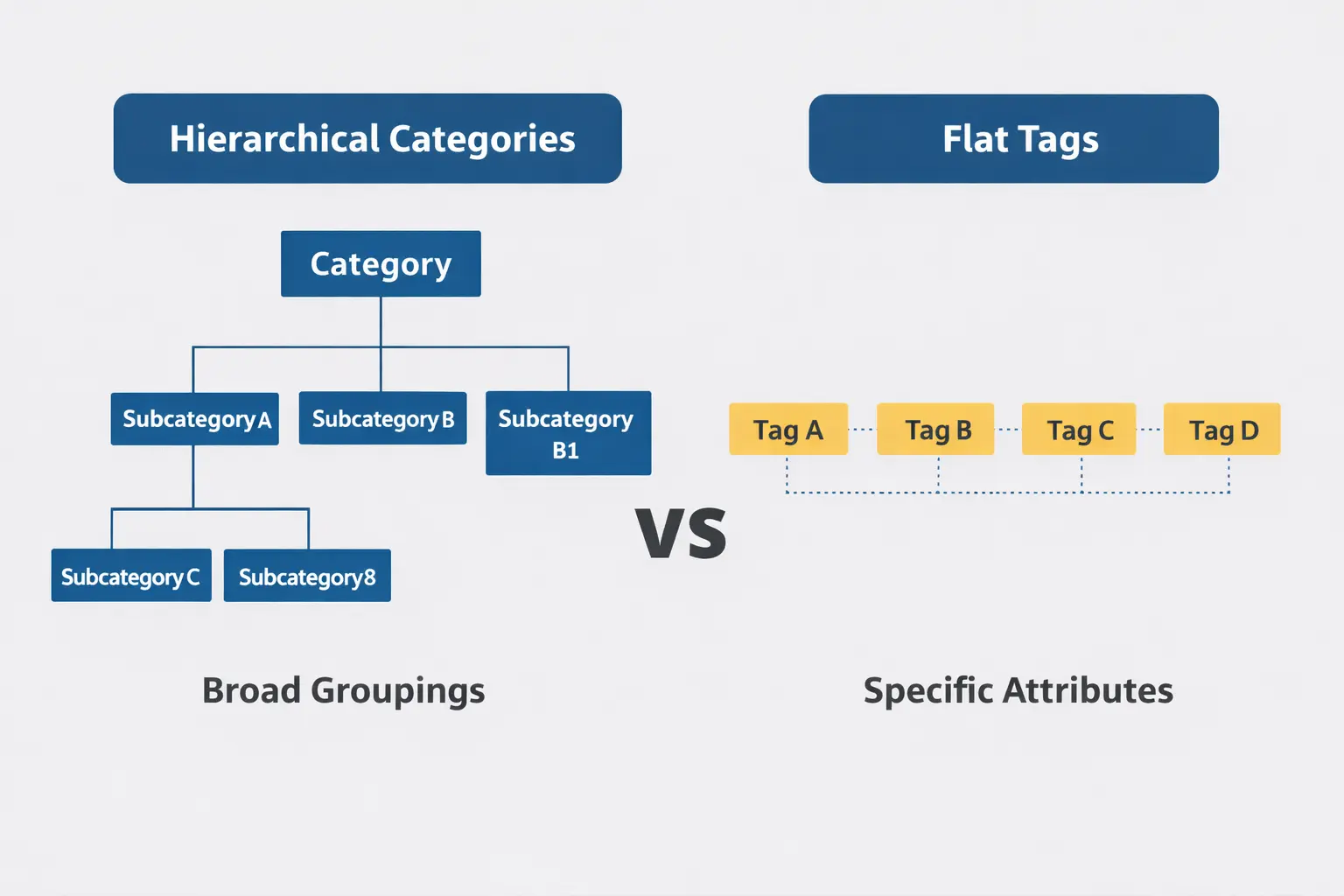
Before we dive into the differences, let’s get one thing straight: categories and tags are both taxonomies. In WordPress, a taxonomy is simply a way to group things together.
Think of it like organizing your closet:
-
Categories are like the main sections: shirts, pants, shoes
-
Tags are like the specific attributes: casual, formal, cotton, leather
What Are Categories?
Categories are meant for broad groupings of your content. They’re hierarchical, which means you can have parent and child categories. For example:
-
Marketing (Parent Category)
-
Content Marketing (Child Category)
-
Social Media Marketing (Child Category)
-
Email Marketing (Child Category)
-
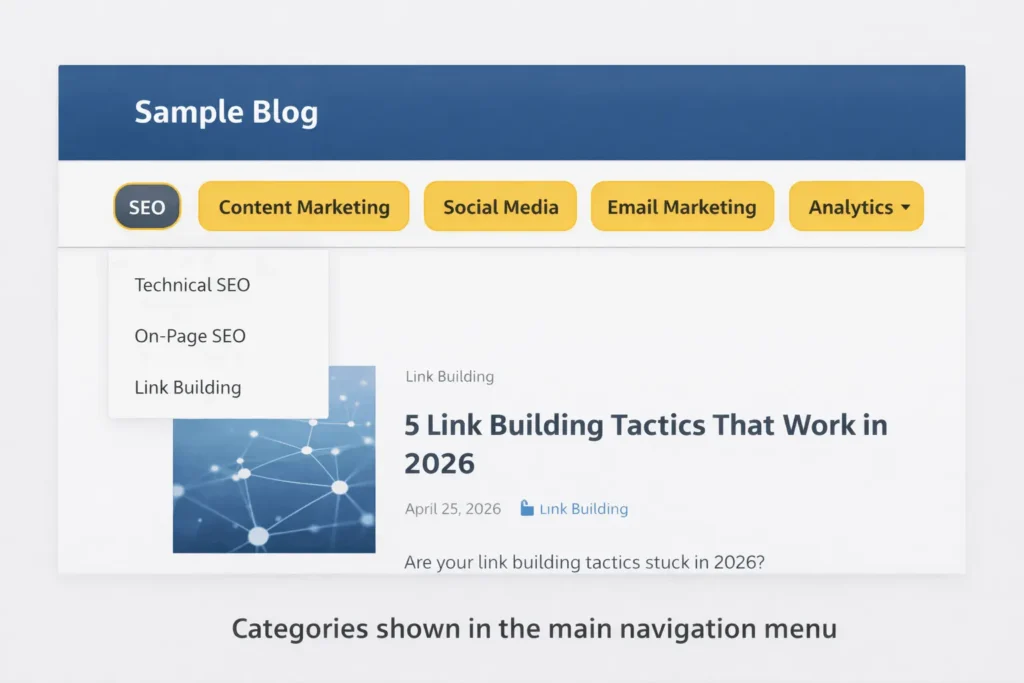
Categories are typically displayed in your navigation menu, and they’re mandatory in WordPress (every post must belong to at least one category).
What Are Tags?
Tags are descriptive micro-data that describe specific details about your post. They’re non-hierarchical and completely optional. Tags help users find related content that might not belong to the same category.
For a recipe blog:
-
Category: “Desserts”
-
Tags: “chocolate,” “gluten-free,” “quick-recipes,” “no-bake”
The SEO Impact: Why It Matters
How Google Views Your Site Structure
Google’s crawlers love well-organized websites. When you properly use categories and tags, you’re essentially creating a roadmap for search engines to follow. Here’s what happens behind the scenes:
Category Pages as Topic Hubs
When you consistently post content under specific categories, those category pages gain authority over time. Google recognizes them as topic hubs—pages that comprehensively cover a subject area.
Tag Pages as Long-Tail Opportunities
Tag pages often rank for specific, long-tail search queries. If someone searches for “gluten-free chocolate dessert recipes,” your tag page for “gluten-free” combined with “chocolate” becomes a relevant landing page.
Common SEO Problems with Misused Taxonomies
-
Duplicate Content Issues
-
Same content appearing under multiple URLs
-
Category and tag archives showing similar content
-
Multiple tag combinations creating thousands of thin pages
-
-
Keyword Cannibalization
-
Multiple pages targeting the same keyword
-
Search engines unsure which page to rank
-
Diluted link equity
-
-
Thin Content Pages
-
Tag pages with only one or two posts
-
Empty category pages
-
Google may treat these as low-quality pages and reduce their crawl priority or visibility in search results.
-
Categories vs Tags: The Ultimate Comparison
| Feature | Categories | Tags |
|---|---|---|
| Purpose | Broad topic grouping | Specific post details |
| Hierarchy | Yes (parent/child) | No (flat) |
| Required? | Yes (at least one) | No (optional) |
| Navigation | Usually in menus | Rarely in menus |
| URL Structure | /category/topic/ | /tag/keyword/ |
| Post Limit | No limit, but keep focused | Limit to 5-10 per post |
| SEO Weight | High (topic authority) | Medium (specific queries) |
Which Is Better for SEO: Categories or Tags?
Categories are generally more powerful for SEO. They define your site’s primary structure and act as topic hubs that accumulate authority over time.
Tags, on the other hand, are supportive. They help search engines understand specific details of your content and can rank for niche, long-tail queries. However, tags rarely carry the same authority weight as well-optimized category pages.
The best approach is not choosing one over the other — it’s using both strategically. Categories build your content architecture. Tags strengthen cross-linking and semantic relevance.
When to Use Categories
Use categories when:
-
Creating your site’s main navigation structure
-
Grouping cornerstone content
-
Establishing topic clusters
-
You have at least 5-10 posts on that topic
Real-World Example:
A digital marketing blog might have categories like:
-
SEO
-
Content Marketing
-
Social Media
-
Email Marketing
-
Analytics
When to Use Tags
Use tags when:
-
Describing specific post elements
-
Connecting related content across categories
-
Targeting long-tail keywords
-
You’ll use them consistently across posts
Real-World Example:
For posts in the SEO category, tags might include:
-
“Google updates”
-
“keyword research”
-
“technical SEO”
-
“link building”
-
“local SEO”
SEO Best Practices for Categories
1. Limit Your Categories
Having 5-10 main categories is ideal for most websites. Too many categories dilute your site’s focus and confuse users. Each category should represent a pillar topic that you’ll consistently write about.
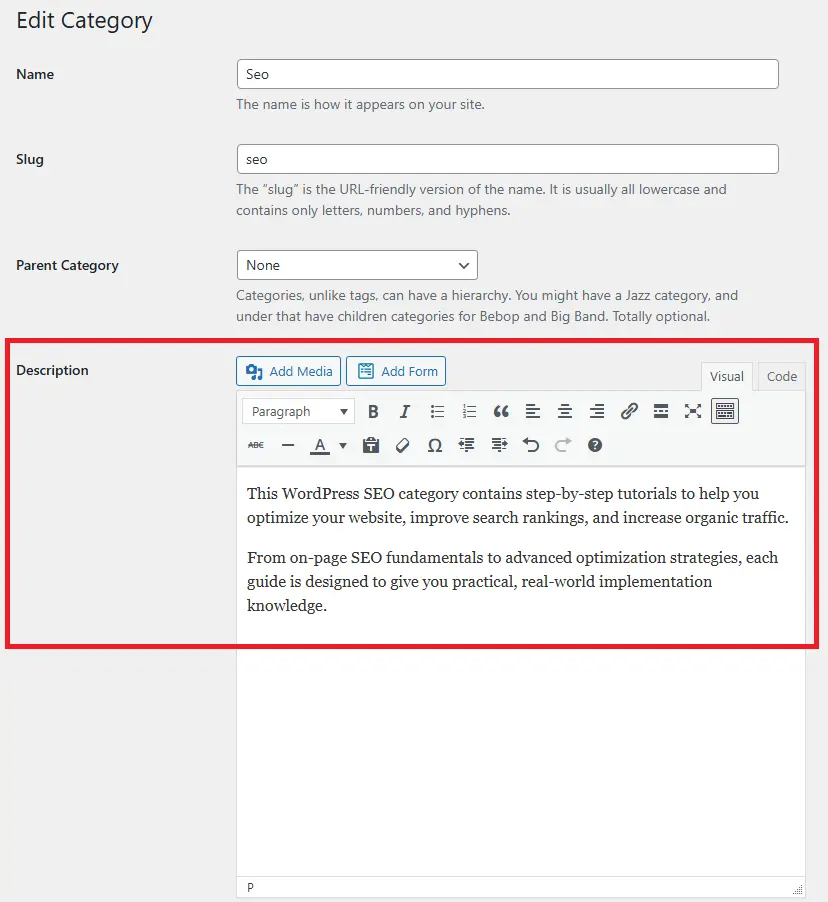
2. Optimize Category Descriptions
WordPress allows you to add descriptions to your categories. Use this space! Write 2-3 sentences explaining what readers will find in that category, naturally incorporating your target keywords.
3. Set a Preferred Category for Each Post
Even if a post fits multiple categories, choose one primary category to avoid duplication. The others can be secondary, but WordPress will always show the post in all assigned categories.
4. Use Categories in Your URL Structure
Consider including categories in your permalinks: website.com/category/post-name/. This reinforces the topic hierarchy for both users and search engines.
5. Create Compelling Category Content
Don’t let your category pages be simple lists. Add introductory text, featured images, and consider using a grid layout that highlights your best content in that category.
SEO Best Practices for Tags
1. Be Selective with Tags
Never create tags on the fly. Plan your tagging system in advance. Each tag should represent a concept you’ll reference repeatedly across multiple posts.
2. Limit Tags Per Post
Stick to 5-10 relevant tags maximum. More than that looks spammy and confuses both readers and search engines.
3. Avoid Single-Use Tags
If a tag only applies to one post, delete it. Single-use tags create thin archive pages that waste crawl budget — something that can negatively impact your overall technical SEO performance. Merge similar tags to consolidate authority.
4. Use Tags for Specificity
Tags should be more specific than categories. While “SEO” might be a category, “voice-search-optimization” could be a tag you use across SEO, content marketing, and tech categories.
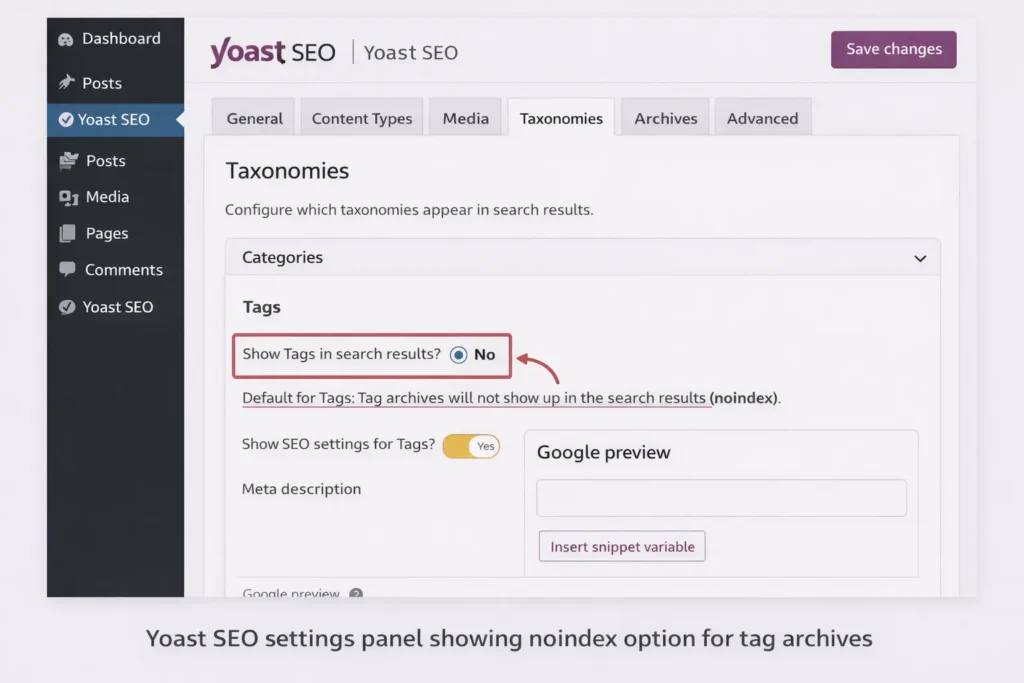
5. Noindex Low-Value Tag Archives
Consider using Yoast SEO or Rank Math to set tag archives to “noindex” if they don’t provide unique value. This preserves crawl budget for your important pages.
Common Mistakes to Avoid
Mistake #1: Using Tags as Categories
I see this constantly—people create tags like “marketing,” “business,” “technology” that should clearly be categories. If a term is broad enough to have child terms, it’s probably a category.
Mistake #2: Creating Too Many Tags
One lifestyle blog I audited had 847 tags for just 200 posts. Nearly 60% of those tags were used only once. As a result, the site had hundreds of thin tag archive pages indexed in Google, many with only one article listed. After consolidating tags, deleting single-use terms, and noindexing low-value archives, organic traffic improved within three months due to better crawl efficiency and stronger category authority.
Mistake #3: Ignoring Category/Tag Base Removal
By default, WordPress adds /category/ and /tag/ to your URLs. While not inherently bad, removing these (using plugins or code) can create cleaner URLs: website.com/seo/ instead of website.com/category/seo/
Important: If your site is already indexed, changing taxonomy URLs without proper redirects can break existing rankings. Always implement 301 redirects before removing category or tag bases.
Mistake #4: Not Updating Your Taxonomy
As your site grows, your categories and tags should evolve. Review them quarterly. Merge similar tags, delete unused ones, and consider splitting oversized categories.
Step-by-Step Setup Guide
Initial Category Structure Setup
-
Brainstorm Your Core Topics
-
List 5-10 main subjects you’ll cover
-
These become your parent categories
-
Ensure each could support 20+ posts
-
-
Create Child Categories
-
For each parent, list 2-5 subtopics
-
Only create if you’ll write multiple posts
-
Example: SEO > Technical SEO, On-Page SEO, Off-Page SEO
-
-
Configure Permalinks
-
Go to Settings > Permalinks (learn more in our complete WordPress permalink structure guide).
-
Choose “Post name” or “/category/post-name/”
-
Save changes
-
Tag System Development
-
Analyze Your Content
-
Review 20 existing posts
-
Identify recurring themes and details
-
List potential tags
-
-
Create a Tag Taxonomy
-
Group similar tag ideas
-
Establish naming conventions (all lowercase, hyphenated)
-
Aim for 20-50 core tags maximum
-
-
Document Your System
-
Create a simple spreadsheet
-
Share with your writing team
-
Ensure consistent usage
-
Advanced SEO Strategies
Using Categories for Topic Clusters
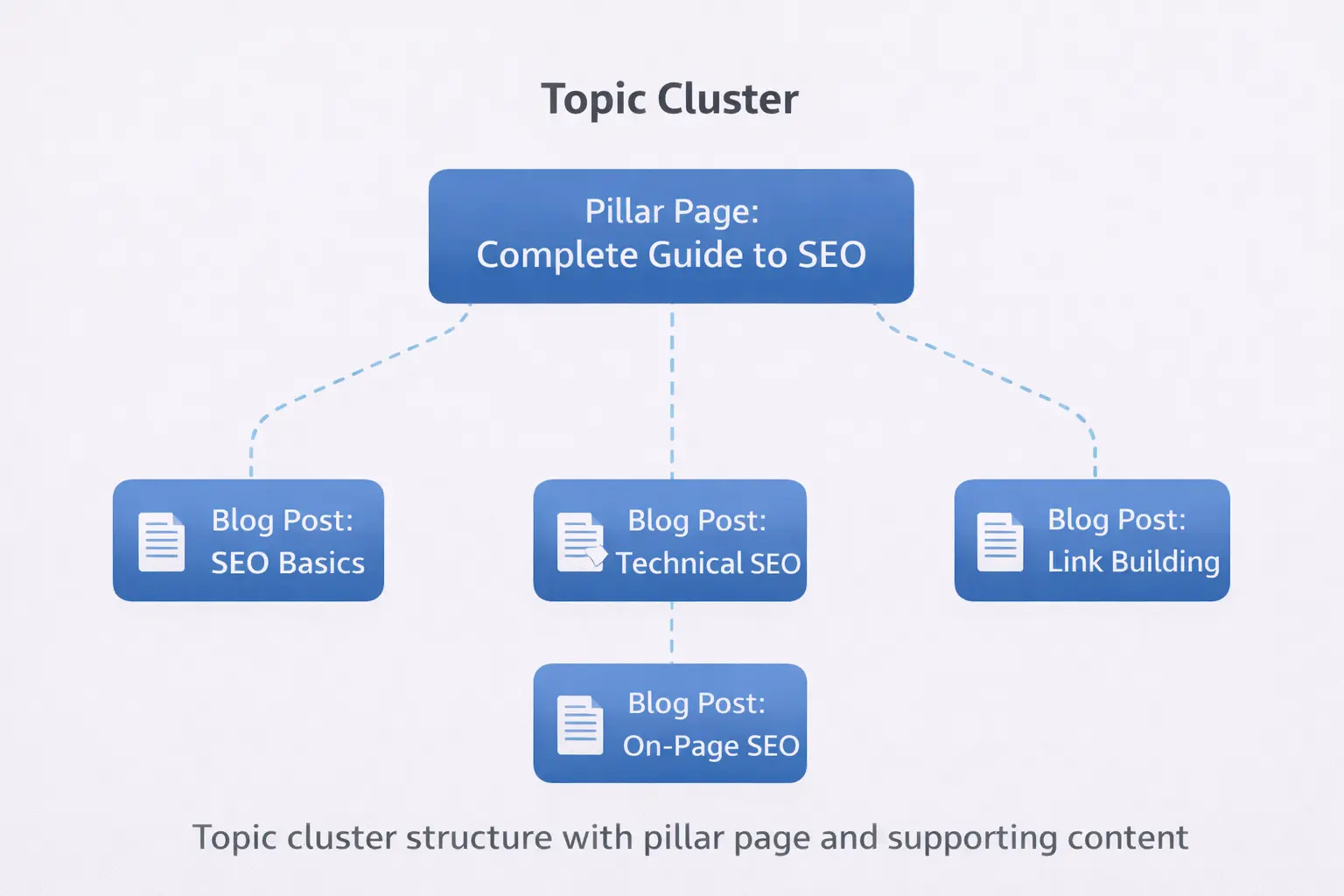
Topic clusters are an advanced SEO strategy where you create a “pillar page” about a broad topic and link to multiple “cluster content” posts about related subtopics. Categories naturally support this structure.
How to implement:
-
Choose a category as your pillar topic
-
Create a comprehensive pillar page (3000+ words)
-
Write cluster content posts in the same category
-
Link from pillar to clusters and back
Schema Markup for Taxonomy Pages
Add Schema markup to your category and tag pages to help search engines understand their purpose:
-
CollectionPage schema for category archives
-
BreadcrumbList schema for navigation
-
SiteNavigationElement for menu structures
Internal Linking with Categories and Tags
Use your taxonomy to create intelligent internal linking:
-
Automatically link posts within the same category in a “Related Posts” section
-
Create tag clouds that link to relevant content
-
Use breadcrumbs showing category hierarchy
Tools and Plugins
Recommended Plugins
-
Yoast SEO or Rank Math
-
Control indexation of taxonomies
-
Add meta descriptions to category pages
-
Prevent duplicate content
-
-
Category Order and Taxonomy Terms Order
-
Customize category display order
-
Improve user experience
-
-
Breadcrumb NavXT
-
Advanced breadcrumb controls
-
Show full category hierarchy
-
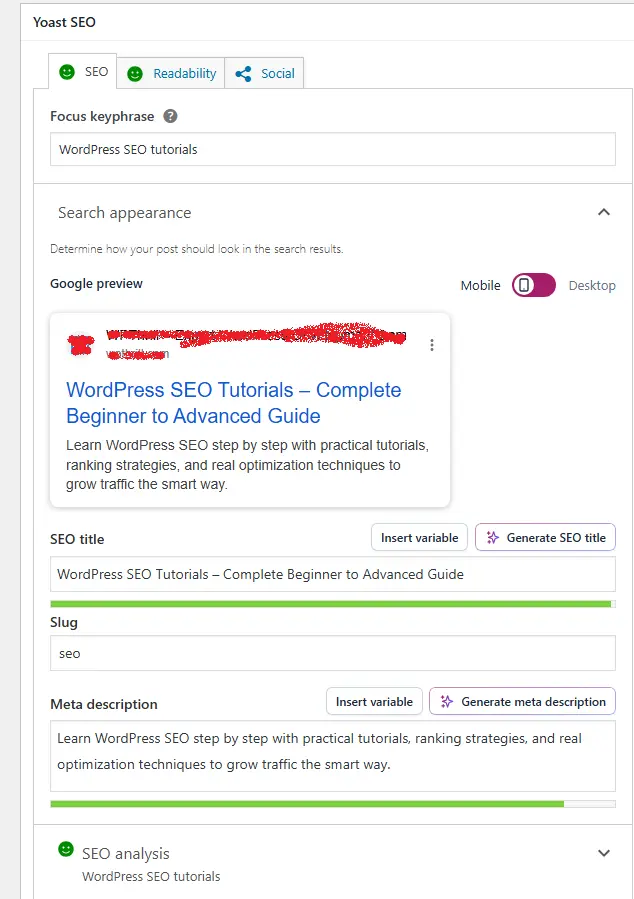
Setting Up with Yoast SEO
-
Install and activate Yoast SEO
-
Go to SEO > Search Appearance > Taxonomies
-
Configure category and tag archive settings:
-
Show categories in search results? YES
-
Show tags in search results? OPTIONAL
-
Add meta descriptions templates
-
FAQ Section
Q: How many categories should I have in WordPress?
A: Aim for 5-10 main categories. This provides enough structure without overwhelming users or diluting your site’s focus. Each category should represent a core topic you consistently cover.
Q: Do tags help with SEO?
A: Yes, when used correctly. Tags help search engines understand the specific details of your content and can rank for long-tail keywords. However, misuse (like having hundreds of thin tag pages) can harm your SEO.
Q: Should I noindex tag archives?
A: Consider noindexing tag archives if they don’t provide unique value. Keep them indexed if each tag page has substantial, unique content (at least 5-10 posts with proper descriptions).
Q: Can I use both categories and tags?
A: Absolutely. In fact, using both correctly creates a robust content organization system. Categories for broad topics, tags for specific details.
Q: How do I fix duplicate content from categories and tags?
A: Use canonical tags to point to the primary version of your content. Set preferred category for each post, and consider noindexing low-value tag archives.
Conclusion
Mastering WordPress categories vs tags isn’t just about organization—it’s about creating a strategic content framework that search engines love and users find intuitive. From an SEO perspective, your taxonomy structure directly impacts how search engines crawl, understand, and rank your content. A well-organized category system combined with a disciplined tagging strategy creates a clear topical hierarchy — something Google increasingly rewards.
Key Takeaways:
-
-
Categories = broad topics, hierarchical, required
-
Tags = specific details, non-hierarchical, optional
-
Use categories for site structure and topic authority
-
Use tags for cross-linking and long-tail SEO
-
-
Review and refine your taxonomy quarterly
-
Never create single-use tags
-
Optimize category pages with descriptions
-
Consider noindexing low-value tag archives
Remember, your content organization system should make it easier for both humans and search engines to navigate your site. When you structure categories and tags strategically, you’re not just organizing posts — you’re building a scalable SEO architecture that compounds authority over time.
Next Tutorial: WordPress Media Library Explained: Complete Beginner’s Guide (2026 Step-by-Step Tutorial)
Previous Tutorial: WordPress User Roles Explained: Complete Guide to Roles & Permissions (Beginner Friendly)



