






You’ve built an amazing portfolio plugin. Custom post types? Check. Taxonomies? Check. Beautiful grid with filtering? Check. If you’re new to plugin development, follow our complete WordPress Plugin Development Tutorial where we build a real plugin step-by-step.
But there’s a problem.
When users first activate your plugin and try to visit their portfolio page, they see this:
404 Not Found
The page you requested could not be found.
Your heart sinks. Your plugin is perfect, but the first experience is broken.
What happened? WordPress doesn’t know about your custom post type URLs until you tell it. And the way you tell it is by “flushing rewrite rules.”
In this tutorial, you’ll master WordPress activation hooks. You’ll learn how to:
-
Run code when your plugin activates
-
Set default options automatically
-
Flush rewrite rules at exactly the right time
-
Clean up when your plugin deactivates
No more 404 errors. No more confused users.
Understanding the Problem: Why 404 Errors Happen
When you register a custom post type with 'rewrite' => array('slug' => 'portfolio'), you’re telling WordPress: “Please create URL rules for /portfolio/ and /portfolio/project-name/.”
But WordPress doesn’t automatically add these rules to its database. It waits for something to trigger a “rewrite flush.”
What triggers a rewrite flush?
-
Visiting Settings → Permalinks and clicking “Save Changes”
-
Activating a plugin that calls
flush_rewrite_rules() -
Switching themes (sometimes)
Without a flush, WordPress doesn’t know your URLs exist. Hence, 404.
The Solution: Activation and Deactivation Hooks
WordPress provides hooks that run exactly once when your plugin activates or deactivates:
| Hook | Function | When It Runs |
|---|---|---|
| Activation | register_activation_hook() |
When plugin is activated |
| Deactivation | register_deactivation_hook() |
When plugin is deactivated |
| Uninstall | register_uninstall_hook() |
When plugin is deleted |
Look at your main plugin file (wp-creative-portfolio-pro.php). You already have these hooks set up:
/**
 * Plugin Activation
 */
function wp_creative_portfolio_activate() {

    // Set default options if none exist
    if (false === get_option('wp_creative_portfolio_options')) {
        $defaults = array(
            'plural_name'     => __('Portfolios', 'wp-creative-portfolio'),
            'singular_name'   => __('Portfolio', 'wp-creative-portfolio'),
            'slug'            => 'portfolio',
            'taxonomy_slug'   => 'portfolio-category',
            'posts_per_page'  => 9
        );
        update_option('wp_creative_portfolio_options', $defaults);
    }

    // Load plugin class
    $plugin = new WP_Creative_Portfolio();

    // Register CPT & Taxonomy before flushing
    $plugin->register_portfolio_cpt();
    $plugin->register_portfolio_taxonomy();

    // Flush rewrite rules
    flush_rewrite_rules();
}
register_activation_hook(__FILE__, 'wp_creative_portfolio_activate');

/**
 * Plugin Deactivation
 */
function wp_creative_portfolio_deactivate() {
    flush_rewrite_rules();
}
register_deactivation_hook(__FILE__, 'wp_creative_portfolio_deactivate');
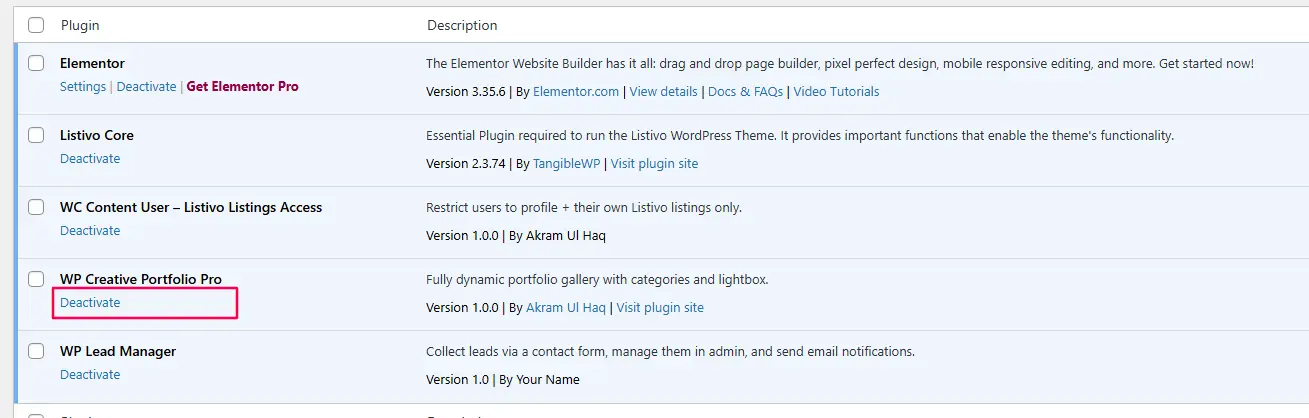
*Figure 2: Users click these links to activate/deactivate your plugin*
Breaking Down the Activation Hook
Let’s examine each part of your activation function:
1. Setting Default Options
if (false === get_option('wp_creative_portfolio_options')) {
    $defaults = array(
        'plural_name'     => __('Portfolios', 'wp-creative-portfolio'),
        'singular_name'   => __('Portfolio', 'wp-creative-portfolio'),
        'slug'            => 'portfolio',
        'taxonomy_slug'   => 'portfolio-category',
        'posts_per_page'  => 9
    );
    update_option('wp_creative_portfolio_options', $defaults);
}
Why this matters: When a user activates your plugin, they expect it to work immediately. If you don’t set defaults, your code might try to read options that don’t exist—causing PHP notices or worse.
Important: We check if options exist first with get_option(). If they do, we don’t overwrite them. This preserves user settings if they’re reactivating.
2. Loading the Plugin Class
$plugin = new WP_Creative_Portfolio();
We need an instance of our main class to call its methods. But wait—doesn’t our plugin already create an instance?
function run_wp_creative_portfolio_pro() {
    new WP_Creative_Portfolio();
    new WP_Creative_Portfolio_Settings();
}
run_wp_creative_portfolio_pro();
Yes, but that runs on init hook, after WordPress is fully loaded. On activation, WordPress hasn’t loaded everything yet. We need to manually create the instance.
3. Registering Post Types Before Flushing
$plugin->register_portfolio_cpt();
$plugin->register_portfolio_taxonomy();
This is critical. If you flush rewrite rules without registering your post types first, WordPress doesn’t know what rules to create. You must register them in the same request.
4. Flushing the Rules
flush_rewrite_rules();
This tells WordPress: “Delete all your old URL rules and rebuild them from scratch.” After this call, WordPress knows about /portfolio/ and /portfolio-category/design/.
Why the Deactivation Hook Matters
function wp_creative_portfolio_deactivate() {
    flush_rewrite_rules();
}
register_deactivation_hook(__FILE__, 'wp_creative_portfolio_deactivate');
When your plugin deactivates, your custom post types disappear. But WordPress still has rules for them in the database. This can cause 404 errors on other parts of the site.
Flushing on deactivation cleans up those orphaned rules.
The Wrong Way to Flush Rewrite Rules
Never do this:
// BAD - Flushes on every page load
add_action('init', 'flush_rewrite_rules');
This would flush rewrite rules on EVERY page load. Your site would slow to a crawl, and you might crash the database.
Also bad:
// BAD - Flushes on every admin page load
add_action('admin_init', 'flush_rewrite_rules');
Rewrite rules are stored in the database. Flushing them is an expensive operation—it rebuilds hundreds of rules. Only do it when necessary (activation, deactivation, or slug changes).
Complete Activation Function with Error Handling
Here’s an enhanced version of your activation function with better error handling:
/**
 * Plugin Activation
 */
function wp_creative_portfolio_activate() {

    // Set default options if none exist
    if (false === get_option('wp_creative_portfolio_options')) {
        $defaults = array(
            'plural_name'     => __('Portfolios', 'wp-creative-portfolio'),
            'singular_name'   => __('Portfolio', 'wp-creative-portfolio'),
            'slug'            => 'portfolio',
            'taxonomy_slug'   => 'portfolio-category',
            'posts_per_page'  => 9
        );
        update_option('wp_creative_portfolio_options', $defaults);
    }

    // Check if class exists
    if (!class_exists('WP_Creative_Portfolio')) {
        // Something's wrong - include the file manually
        require_once WPCP_PLUGIN_DIR . 'includes/class-wp-creative-portfolio.php';
    }

    // Load plugin class
    $plugin = new WP_Creative_Portfolio();

    // Register CPT & Taxonomy before flushing
    $plugin->register_portfolio_cpt();
    $plugin->register_portfolio_taxonomy();

    // Clear any cached rewrite rules
    delete_option('rewrite_rules');

    // Flush rewrite rules
    flush_rewrite_rules();

    // Set a transient to show welcome message
    set_transient('wp_creative_portfolio_activated', true, 5);
}
register_activation_hook(__FILE__, 'wp_creative_portfolio_activate');

/**
 * Show welcome message after activation
 */
function wp_creative_portfolio_admin_notice() {
    // Check transient
    if (!get_transient('wp_creative_portfolio_activated')) {
        return;
    }

    // Only show to admins
    if (!current_user_can('manage_options')) {
        return;
    }
    ?>
    <div class="notice notice-success is-dismissible">
        <p>
            <strong><?php esc_html_e('WP Creative Portfolio Pro activated!', 'wp-creative-portfolio'); ?></strong><br>
            <?php esc_html_e('Use the shortcode', 'wp-creative-portfolio'); ?>
            <code>[wp_creative_portfolio]</code>
            <?php esc_html_e('to display your portfolio.', 'wp-creative-portfolio'); ?><br>
            <a href="<?php echo esc_url(admin_url('options-general.php?page=wp-creative-portfolio')); ?>">
                <?php esc_html_e('Configure Settings', 'wp-creative-portfolio'); ?>
            </a>
        </p>
    </div>
    <?php
    // Delete transient so message only shows once
    delete_transient('wp_creative_portfolio_activated');
}
add_action('admin_notices', 'wp_creative_portfolio_admin_notice');
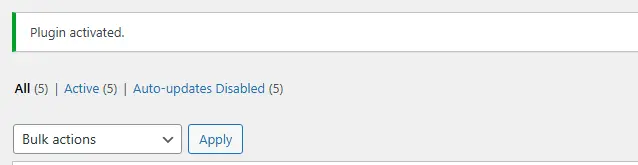
Figure 3: Welcome message displayed after successful activation
Handling Slug Changes in Settings
What if users change the portfolio slug in settings? They’ll get 404 errors again. Here’s how to handle that:
In your settings class (class-wp-creative-portfolio-settings.php), update the sanitize method:
public function sanitize($input) {

    // Verify nonce (existing code)
    if (!isset($_POST['_wpnonce']) || !wp_verify_nonce($_POST['_wpnonce'], 'wp_creative_portfolio_options-options')) {
        // ... error handling
    }

    // Get old options to compare
    $old_options = get_option('wp_creative_portfolio_options');

    // Sanitize as before
    $sanitized = array();
    $sanitized['plural_name'] = sanitize_text_field($input['plural_name']);
    $sanitized['singular_name'] = sanitize_text_field($input['singular_name']);
    $sanitized['slug'] = sanitize_title($input['slug'], 'portfolio');
    $sanitized['taxonomy_slug'] = sanitize_title($input['taxonomy_slug'], 'portfolio-category');
    $sanitized['posts_per_page'] = intval($input['posts_per_page']);

    // Check if slug changed
    if ($old_options['slug'] !== $sanitized['slug'] ||
        $old_options['taxonomy_slug'] !== $sanitized['taxonomy_slug']) {

        // Set a flag to flush rewrite rules
        set_transient('wp_creative_portfolio_flush_rules', true);
    }

    return $sanitized;
}
Then in your main plugin file:
/**
 * Check if we need to flush rewrite rules
 */
function wp_creative_portfolio_check_flush() {
    if (get_transient('wp_creative_portfolio_flush_rules')) {
        flush_rewrite_rules();
        delete_transient('wp_creative_portfolio_flush_rules');
    }
}
add_action('init', 'wp_creative_portfolio_check_flush');
This flushes rewrite rules only when slugs change—not on every page load.
Testing Your Activation Hook
Test 1: Fresh Installation
-
Deactivate and delete your plugin (if installed)
-
Reinstall and activate it
-
Check database for
wp_creative_portfolio_options(use phpMyAdmin or a plugin like WP Data Access) -
Default options should exist
-
Visit
/portfolio/– should work, not 404
Test 2: Reactivation
-
Change some settings (different slug, different names)
-
Deactivate plugin
-
Reactivate plugin
-
Check if your settings were preserved (they should be)
-
URLs should still work
Test 3: Slug Change
-
Change portfolio slug in settings to “work”
-
Save settings
-
Visit
/work/– should work -
Old
/portfolio/should 404 (correct behavior)
Test 4: Deactivation Cleanup
-
Deactivate plugin
-
Activate another plugin with custom post types (like WooCommerce)
-
Their URLs should work – your deactivation shouldn’t break other plugins
Common Problems and Solutions
Problem: Still Getting 404 After Activation
Check:
-
Did you register post types BEFORE flushing?
-
Is your
.htaccessfile writable? (Apache servers) -
Try manual flush: Settings → Permalinks → Save Changes
Problem: Settings Lost on Reactivation
Check:
-
Your activation hook should only set defaults if options don’t exist
-
You’re using
if (false === get_option(...)), not overwriting existing options
Problem: Site Slows Down
Check:
-
Are you flushing rewrite rules on every page load? (You shouldn’t be)
-
Look for
flush_rewrite_rules()ininithooks
Problem: “Headers Already Sent” Errors
Check:
-
No output before activation hook (no echoes, no whitespace)
-
Plugin file starts with
<?php– no spaces before it
Advanced: Uninstall Hook
When users delete your plugin (not just deactivate), you might want to clean up data:
Create uninstall.php in your plugin root:
<?php
/**
 * Uninstall script
 *
 * Runs when user deletes the plugin
 */

// If uninstall not called from WordPress, exit
if (!defined('WP_UNINSTALL_PLUGIN')) {
    exit;
}

// Delete options
delete_option('wp_creative_portfolio_options');

// If using custom tables, drop them here
// global $wpdb;
// $wpdb->query("DROP TABLE IF EXISTS {$wpdb->prefix}portfolio_stats");

// Clean up any transients
delete_transient('wp_creative_portfolio_flush_rules');

// Flush rewrite rules to clean up
flush_rewrite_rules();

Figure 4: The Delete link triggers your uninstall.php file
Complete Main Plugin File with Enhanced Activation
Here’s your complete wp-creative-portfolio-pro.php with all activation features:
<?php
/**
 * Plugin Name: WP Creative Portfolio Pro
 * Plugin URI:  https://yourwebsite.com/wp-creative-portfolio
 * Description: A complete portfolio plugin with categories, lightbox, and shortcodes.
 * Version:     1.0.0
 * Author:      Your Name
 * Author URI:  https://yourwebsite.com
 * License:     GPL v2 or later
 * License URI: https://www.gnu.org/licenses/gpl-2.0.html
 * Text Domain: wp-creative-portfolio
 * Domain Path: /languages
 *
 * @package WP_Creative_Portfolio
 */

if ( ! defined( 'ABSPATH' ) ) {
    exit;
}

define( 'WPCP_VERSION', '1.0.0' );
define( 'WPCP_PLUGIN_FILE', __FILE__ );
define( 'WPCP_PLUGIN_DIR', plugin_dir_path( __FILE__ ) );
define( 'WPCP_PLUGIN_URL', plugin_dir_url( __FILE__ ) );

/**
 * Load plugin text domain
 */
function wp_creative_portfolio_load_textdomain() {
    load_plugin_textdomain(
        'wp-creative-portfolio',
        false,
        dirname( plugin_basename( __FILE__ ) ) . '/languages'
    );
}
add_action( 'plugins_loaded', 'wp_creative_portfolio_load_textdomain' );

// Include main classes
require_once WPCP_PLUGIN_DIR . 'includes/class-wp-creative-portfolio.php';
require_once WPCP_PLUGIN_DIR . 'includes/class-wp-creative-portfolio-settings.php';

/**
 * Plugin Activation
 */
function wp_creative_portfolio_activate() {

    // Set default options if none exist
    if ( false === get_option( 'wp_creative_portfolio_options' ) ) {
        $defaults = array(
            'plural_name'     => __( 'Portfolios', 'wp-creative-portfolio' ),
            'singular_name'   => __( 'Portfolio', 'wp-creative-portfolio' ),
            'slug'            => 'portfolio',
            'taxonomy_slug'   => 'portfolio-category',
            'posts_per_page'  => 9
        );
        update_option( 'wp_creative_portfolio_options', $defaults );
    }

    // Ensure class exists
    if ( ! class_exists( 'WP_Creative_Portfolio' ) ) {
        require_once WPCP_PLUGIN_DIR . 'includes/class-wp-creative-portfolio.php';
    }

    // Load plugin class
    $plugin = new WP_Creative_Portfolio();

    // Register CPT & Taxonomy before flushing
    $plugin->register_portfolio_cpt();
    $plugin->register_portfolio_taxonomy();

    // Clear any cached rules
    delete_option( 'rewrite_rules' );

    // Flush rewrite rules
    flush_rewrite_rules();

    // Set transient for welcome message
    set_transient( 'wp_creative_portfolio_activated', true, 5 );
}
register_activation_hook( __FILE__, 'wp_creative_portfolio_activate' );

/**
 * Plugin Deactivation
 */
function wp_creative_portfolio_deactivate() {
    flush_rewrite_rules();
}
register_deactivation_hook( __FILE__, 'wp_creative_portfolio_deactivate' );

/**
 * Check if we need to flush rewrite rules (after slug changes)
 */
function wp_creative_portfolio_check_flush() {
    if ( get_transient( 'wp_creative_portfolio_flush_rules' ) ) {
        flush_rewrite_rules();
        delete_transient( 'wp_creative_portfolio_flush_rules' );
    }
}
add_action( 'init', 'wp_creative_portfolio_check_flush' );

/**
 * Show welcome notice after activation
 */
function wp_creative_portfolio_admin_notice() {
    if ( ! get_transient( 'wp_creative_portfolio_activated' ) ) {
        return;
    }

    if ( ! current_user_can( 'manage_options' ) ) {
        return;
    }
    ?>
    <div class="notice notice-success is-dismissible">
        <p>
            <strong><?php esc_html_e( 'WP Creative Portfolio Pro activated!', 'wp-creative-portfolio' ); ?></strong><br>
            <?php esc_html_e( 'Use the shortcode', 'wp-creative-portfolio' ); ?>
            <code>[wp_creative_portfolio]</code>
            <?php esc_html_e( 'to display your portfolio.', 'wp-creative-portfolio' ); ?><br>
            <a href="<?php echo esc_url( admin_url( 'options-general.php?page=wp-creative-portfolio' ) ); ?>">
                <?php esc_html_e( 'Configure Settings', 'wp-creative-portfolio' ); ?>
            </a>
        </p>
    </div>
    <?php
    delete_transient( 'wp_creative_portfolio_activated' );
}
add_action( 'admin_notices', 'wp_creative_portfolio_admin_notice' );

/**
 * Initialize plugin
 */
function run_wp_creative_portfolio_pro() {
    new WP_Creative_Portfolio();
    new WP_Creative_Portfolio_Settings();
}
run_wp_creative_portfolio_pro();
Frequently Asked Questions
What’s the difference between activation and init hooks?
Activation runs once when a plugin is activated, while the init hook runs on every page load. Because of this, functions like flush_rewrite_rules() should never be placed inside init.
Can I use activation hook to create database tables?
Yes. The activation hook is the perfect place to create custom database tables. Always check first whether the table already exists before creating it.
Why flush on deactivation?
Flushing rewrite rules during deactivation removes your plugin’s custom rewrite rules from the database and prevents potential 404 errors on other parts of the website.
What if my plugin has multiple files with activation needs?
Keep all activation logic in a single function inside the main plugin file. Avoid scattering activation hooks across multiple files.
Can I redirect users after activation?
Yes, but it should be done carefully. A better approach is to use a transient and display an admin notice instead of redirecting users automatically.
What about network activation on multisite?
When a plugin is network-activated on a multisite installation, activation hooks run for each site. You should handle this carefully and use checks like is_network_admin() where needed.
Activation Checklist
-
Default options set on activation
-
Existing options preserved (not overwritten)
-
Post types registered before flush
-
Rewrite rules flushed
-
Welcome notice shown (optional)
-
Deactivation hook flushes rules
-
Slug changes trigger flush
-
No flush on every page load
-
Uninstall hook (if needed) for cleanup
Performance Impact
Good: Flush rewrite rules once on activation/deactivation
Bad: Flush on every page load (kills performance)
Better: Flush only when slugs change (via transient)
Rewrite rules are stored in the database. Flushing rebuilds about 50-200 rules depending on your site. It’s not expensive once, but terrible on every page.
What’s Next?
Your plugin now handles activation perfectly:
✅ Sets default options
✅ Registers post types
✅ Flushes rewrite rules correctly
✅ Shows welcome message
✅ Cleans up on deactivation
In Video 10, the final tutorial, you’ll build a complete settings page using the WordPress Settings API. Users will be able to customize labels, slugs, and display options without touching code.
Watch Video/Post 10 – How to Create Plugin Settings Page
Troubleshooting Quick Reference
| Problem | Likely Cause | Solution |
|---|---|---|
| 404 after activation | Post types not registered before flush | Register then flush |
| 404 after slug change | No flush triggered | Use transient to flush |
| Settings lost | Activation overwriting options | Check if options exist first |
| Site slow | Flush on every page | Remove flush from init |
| Welcome notice shows repeatedly | Transient not deleted | Delete after showing |
Share Your Success!
You’ve fixed the most annoying problem in custom post type development. Your users will never see those 404 errors.
Question: Did you know about activation hooks before this tutorial? Drop a comment below!
Still getting 404s? Post your code and I’ll help you fix it.



