






You’ve built an amazing portfolio plugin. Custom post types? Check. Categories? Check. Beautiful grid? Check.
But there’s one problem: Your users can’t change anything.
The portfolio slug is hardcoded as “portfolio.” What if they want “work” or “projects”? The labels say “Portfolio” everywhere. What if they want to call it “Case Studies” or “My Work”?
Without a settings page, your users are stuck with your defaults. And that’s not professional.
In this final tutorial, you’ll build a complete settings page using the WordPress Settings API. Your users will be able to:
-
Change portfolio labels (plural/singular names)
-
Customize URL slugs
-
Control how many items display
-
See their changes instantly
By the end, your plugin will be truly production-ready—flexible enough for any user’s needs.
If you’re following along with this guide, it’s part of our complete WordPress Plugin Development series where we build real plugins step by step. If you’re new or want to learn everything from the beginning, you can explore the full tutorial series here: WordPress Plugin Development Tutorial. The series covers everything from creating your first plugin to building advanced features like custom post types, taxonomies, shortcodes, and settings pages.
What We’re Building Today
We’re creating class-wp-creative-portfolio-settings.php—a complete settings class that integrates with WordPress’s Settings API.
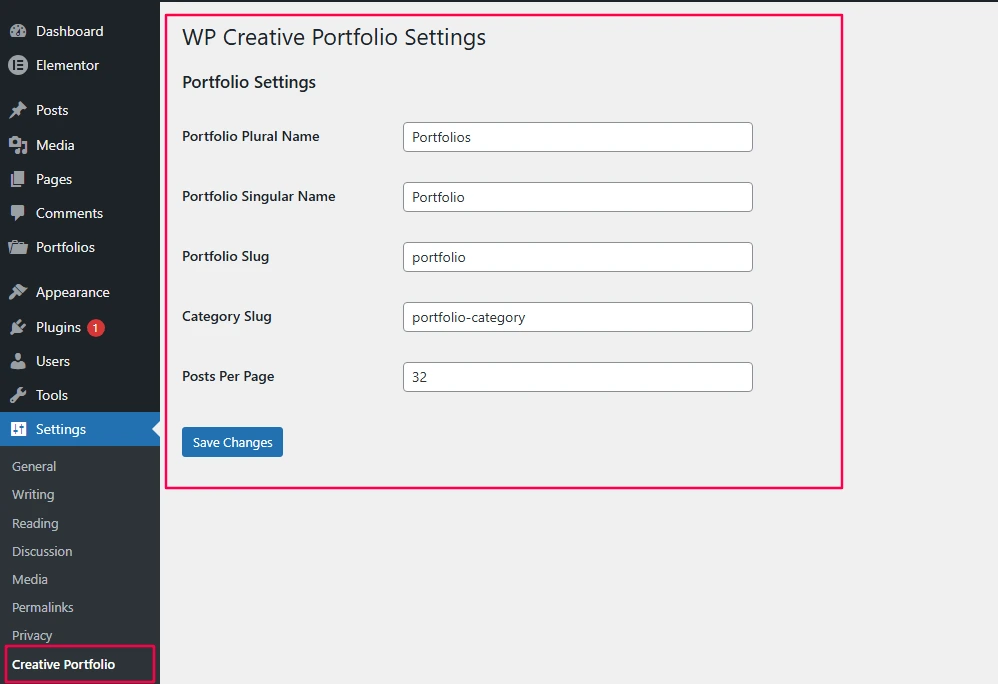
Figure 1: The finished settings page with all configuration options
Understanding the Settings API
The WordPress Settings API is the correct way to add settings pages. It handles:
| Feature | Benefit |
|---|---|
| Form creation | Automatic HTML generation |
| Nonce verification | Built-in security |
| Data sanitization | Your callback runs automatically |
| Settings storage | WordPress handles saving |
| Error messages | Built-in feedback system |
Never build custom forms with manual $_POST handling. The Settings API does it better and more securely.
The Complete Settings Class
Create includes/class-wp-creative-portfolio-settings.php with this complete code:
<?php
/**
 * Portfolio Settings Class
 *
 * Handles all admin settings for the portfolio plugin
 *
 * @package WP_Creative_Portfolio
 */

// Prevent direct access
if ( ! defined( 'ABSPATH' ) ) {
    exit;
}

class WP_Creative_Portfolio_Settings {

    /**
     * Options array from database
     *
     * @var array
     */
    private $options;

    /**
     * Constructor - hook into WordPress
     */
    public function __construct() {
        add_action( 'admin_menu', array( $this, 'add_settings_page' ) );
        add_action( 'admin_init', array( $this, 'register_settings' ) );
        add_action( 'admin_enqueue_scripts', array( $this, 'admin_assets' ) );
    }

    /**
     * Load admin CSS/JS only on our settings page
     *
     * @param string $hook Current admin page
     */
    public function admin_assets( $hook ) {
        // Only load on our settings page
        if ( 'settings_page_wp-creative-portfolio' !== $hook ) {
            return;
        }

        // Verify user has permission
        if ( ! current_user_can( 'manage_options' ) ) {
            return;
        }

        // Add color picker for future enhancements
        wp_enqueue_style( 'wp-color-picker' );
        wp_enqueue_script( 'wp-color-picker' );

        // Add our custom admin CSS if needed
        wp_enqueue_style(
            'wpcp-admin',
            WPCP_PLUGIN_URL . 'assets/css/admin.css',
            array(),
            WPCP_VERSION
        );
    }

    /**
     * Add settings page under Settings menu
     */
    public function add_settings_page() {
        add_options_page(
            __( 'WP Creative Portfolio Settings', 'wp-creative-portfolio' ), // Page title
            __( 'Creative Portfolio', 'wp-creative-portfolio' ),             // Menu title
            'manage_options',                                                  // Capability required
            'wp-creative-portfolio',                                           // Menu slug
            array( $this, 'create_admin_page' )                               // Callback function
        );
    }

    /**
     * Register settings with WordPress
     */
    public function register_settings() {

        // Register a single option array
        register_setting(
            'wp_creative_portfolio_group',        // Option group
            'wp_creative_portfolio_options',      // Option name
            array( $this, 'sanitize' )            // Sanitization callback
        );

        // Add settings section
        add_settings_section(
            'wp_creative_portfolio_section',      // Section ID
            __( 'Portfolio Settings', 'wp-creative-portfolio' ), // Title
            array( $this, 'section_callback' ),   // Callback
            'wp-creative-portfolio'                // Page
        );

        // Define all settings fields
        $fields = array(
            'plural_name'    => __( 'Portfolio Plural Name', 'wp-creative-portfolio' ),
            'singular_name'  => __( 'Portfolio Singular Name', 'wp-creative-portfolio' ),
            'slug'           => __( 'Portfolio Slug', 'wp-creative-portfolio' ),
            'taxonomy_slug'  => __( 'Category Slug', 'wp-creative-portfolio' ),
            'posts_per_page' => __( 'Posts Per Page', 'wp-creative-portfolio' )
        );

        // Register each field
        foreach ( $fields as $field_id => $field_label ) {
            add_settings_field(
                $field_id,
                $field_label,
                array( $this, 'render_field' ),
                'wp-creative-portfolio',
                'wp_creative_portfolio_section',
                array(
                    'id'    => $field_id,
                    'label' => $field_label
                )
            );
        }
    }

    /**
     * Section description
     */
    public function section_callback() {
        echo '<p>' . esc_html__( 'Configure how your portfolio will display and behave.', 'wp-creative-portfolio' ) . '</p>';
        echo '<p>' . esc_html__( 'Changes to slugs may require saving permalinks again.', 'wp-creative-portfolio' ) . '</p>';
    }

    /**
     * Sanitize and validate settings
     *
     * @param array $input Raw input from form
     * @return array Sanitized input
     */
    public function sanitize( $input ) {

        // Verify nonce (WordPress does this automatically via settings_fields)
        // But we'll add extra verification
        if ( ! isset( $_POST['_wpnonce'] ) || ! wp_verify_nonce( $_POST['_wpnonce'], 'wp_creative_portfolio_options-options' ) ) {
            add_settings_error(
                'wp_creative_portfolio_options',
                'wp_creative_portfolio_nonce_error',
                __( 'Security check failed. Please try again.', 'wp-creative-portfolio' ),
                'error'
            );
            return get_option( 'wp_creative_portfolio_options' );
        }

        // Verify user capability
        if ( ! current_user_can( 'manage_options' ) ) {
            add_settings_error(
                'wp_creative_portfolio_options',
                'wp_creative_portfolio_capability_error',
                __( 'You do not have permission to change these settings.', 'wp-creative-portfolio' ),
                'error'
            );
            return get_option( 'wp_creative_portfolio_options' );
        }

        // Get old options for comparison
        $old_options = get_option( 'wp_creative_portfolio_options' );

        // Initialize sanitized array
        $sanitized = array();

        // Sanitize plural name
        $sanitized['plural_name'] = isset( $input['plural_name'] )
            ? sanitize_text_field( $input['plural_name'] )
            : __( 'Portfolios', 'wp-creative-portfolio' );

        // Sanitize singular name
        $sanitized['singular_name'] = isset( $input['singular_name'] )
            ? sanitize_text_field( $input['singular_name'] )
            : __( 'Portfolio', 'wp-creative-portfolio' );

        // Sanitize slug (URL-safe)
        $sanitized['slug'] = isset( $input['slug'] )
            ? sanitize_title( $input['slug'], 'portfolio' )
            : 'portfolio';

        // Sanitize taxonomy slug
        $sanitized['taxonomy_slug'] = isset( $input['taxonomy_slug'] )
            ? sanitize_title( $input['taxonomy_slug'], 'portfolio-category' )
            : 'portfolio-category';

        // Sanitize posts per page (must be integer)
        $sanitized['posts_per_page'] = isset( $input['posts_per_page'] )
            ? intval( $input['posts_per_page'] )
            : 9;

        // Validate posts per page range
        if ( $sanitized['posts_per_page'] < -1 || $sanitized['posts_per_page'] > 50 ) {
            $sanitized['posts_per_page'] = 9;
            add_settings_error(
                'wp_creative_portfolio_options',
                'wp_creative_portfolio_range_error',
                __( 'Posts per page must be between -1 and 50. Reset to default.', 'wp-creative-portfolio' ),
                'warning'
            );
        }

        // Check if slugs changed
        if ( $old_options && ( $old_options['slug'] !== $sanitized['slug'] || $old_options['taxonomy_slug'] !== $sanitized['taxonomy_slug'] ) ) {
            // Set flag to flush rewrite rules
            set_transient( 'wp_creative_portfolio_flush_rules', true );

            add_settings_error(
                'wp_creative_portfolio_options',
                'wp_creative_portfolio_slug_changed',
                __( 'Slug changed. Remember to save permalinks if URLs show 404.', 'wp-creative-portfolio' ),
                'info'
            );
        }

        // Add success message
        add_settings_error(
            'wp_creative_portfolio_options',
            'wp_creative_portfolio_updated',
            __( 'Settings saved successfully!', 'wp-creative-portfolio' ),
            'success'
        );

        return $sanitized;
    }

    /**
     * Render individual settings fields
     *
     * @param array $args Field arguments (id, label)
     */
    public function render_field( $args ) {

        // Get current options
        $options = get_option( 'wp_creative_portfolio_options' );
        $value = isset( $options[ $args['id'] ] ) ? $options[ $args['id'] ] : '';

        // Determine field type
        $type = ( $args['id'] === 'posts_per_page' ) ? 'number' : 'text';

        // Additional attributes for number field
        $min = ( $args['id'] === 'posts_per_page' ) ? 'min="-1" max="50" step="1"' : '';

        ?>
        <input type="<?php echo esc_attr( $type ); ?>"
               name="wp_creative_portfolio_options[<?php echo esc_attr( $args['id'] ); ?>]"
               value="<?php echo esc_attr( $value ); ?>"
               class="regular-text"
               <?php echo $min; ?>
               id="<?php echo esc_attr( $args['id'] ); ?>" />
        <?php

        // Add field descriptions
        switch ( $args['id'] ) {
            case 'plural_name':
                echo '<p class="description">' . esc_html__( 'Example: Portfolios, Projects, Case Studies', 'wp-creative-portfolio' ) . '</p>';
                break;

            case 'singular_name':
                echo '<p class="description">' . esc_html__( 'Example: Portfolio, Project, Case Study', 'wp-creative-portfolio' ) . '</p>';
                break;

            case 'slug':
                echo '<p class="description">' . esc_html__( 'URL slug for portfolio items. Warning: Changing this will break existing URLs!', 'wp-creative-portfolio' ) . '</p>';
                echo '<p class="description">' . esc_html__( 'Current URL structure:', 'wp-creative-portfolio' ) . ' ' . esc_url( home_url( $value ) ) . '</p>';
                break;

            case 'taxonomy_slug':
                echo '<p class="description">' . esc_html__( 'URL slug for portfolio categories. Example: /portfolio-category/design/', 'wp-creative-portfolio' ) . '</p>';
                break;

            case 'posts_per_page':
                echo '<p class="description">' . esc_html__( 'Number of items to display. Use -1 to show all.', 'wp-creative-portfolio' ) . '</p>';
                break;
        }
    }

    /**
     * Render the settings page
     */
    public function create_admin_page() {

        // Verify user capability
        if ( ! current_user_can( 'manage_options' ) ) {
            wp_die(
                esc_html__( 'You do not have sufficient permissions to access this page.', 'wp-creative-portfolio' ),
                esc_html__( 'Permission Denied', 'wp-creative-portfolio' ),
                array( 'response' => 403 )
            );
        }

        // Get options for preview
        $this->options = get_option( 'wp_creative_portfolio_options' );
        ?>
        <div class="wrap">
            <h1><?php echo esc_html__( 'WP Creative Portfolio Settings', 'wp-creative-portfolio' ); ?></h1>

            <?php settings_errors( 'wp_creative_portfolio_options' ); ?>

            <form method="post" action="options.php">
                <?php
                // Output security fields
                settings_fields( 'wp_creative_portfolio_group' );

                // Output setting sections and fields
                do_settings_sections( 'wp-creative-portfolio' );

                // Add nonce field (redundant but safe)
                wp_nonce_field( 'wp_creative_portfolio_options-options' );

                // Submit button
                submit_button( __( 'Save Settings', 'wp-creative-portfolio' ) );
                ?>
            </form>

            <div class="wp-creative-portfolio-info" style="background: #fff; padding: 20px; margin-top: 20px; border: 1px solid #ccd0d4; box-shadow: 0 1px 1px rgba(0,0,0,.04);">
                <h2><?php esc_html_e( 'How to Use Your Portfolio', 'wp-creative-portfolio' ); ?></h2>

                <h3><?php esc_html_e( 'Basic Shortcode', 'wp-creative-portfolio' ); ?></h3>
                <p><?php esc_html_e( 'Add this shortcode to any page or post:', 'wp-creative-portfolio' ); ?></p>
                <code style="display: inline-block; padding: 5px 10px; background: #f1f1f1;">[wp_creative_portfolio]</code>

                <h3><?php esc_html_e( 'Shortcode Parameters', 'wp-creative-portfolio' ); ?></h3>
                <table class="widefat" style="max-width: 800px;">
                    <thead>
                        <tr>
                            <th><?php esc_html_e( 'Parameter', 'wp-creative-portfolio' ); ?></th>
                            <th><?php esc_html_e( 'Default', 'wp-creative-portfolio' ); ?></th>
                            <th><?php esc_html_e( 'Description', 'wp-creative-portfolio' ); ?></th>
                        </tr>
                    </thead>
                    <tbody>
                        <tr>
                            <td><code>title</code></td>
                            <td><?php echo esc_html( $this->options['plural_name'] ?? 'Portfolios' ); ?></td>
                            <td><?php esc_html_e( 'Portfolio section title', 'wp-creative-portfolio' ); ?></td>
                        </tr>
                        <tr>
                            <td><code>description</code></td>
                            <td><?php esc_html_e( 'Check out my latest work', 'wp-creative-portfolio' ); ?></td>
                            <td><?php esc_html_e( 'Portfolio section description', 'wp-creative-portfolio' ); ?></td>
                        </tr>
                        <tr>
                            <td><code>category</code></td>
                            <td><?php esc_html_e( 'all', 'wp-creative-portfolio' ); ?></td>
                            <td><?php esc_html_e( 'Filter by category slug', 'wp-creative-portfolio' ); ?></td>
                        </tr>
                        <tr>
                            <td><code>columns</code></td>
                            <td>3</td>
                            <td><?php esc_html_e( 'Number of columns (1-4)', 'wp-creative-portfolio' ); ?></td>
                        </tr>
                        <tr>
                            <td><code>count</code></td>
                            <td><?php echo esc_html( $this->options['posts_per_page'] ?? 9 ); ?></td>
                            <td><?php esc_html_e( 'Number of items to display', 'wp-creative-portfolio' ); ?></td>
                        </tr>
                    </tbody>
                </table>

                <h3><?php esc_html_e( 'Example', 'wp-creative-portfolio' ); ?></h3>
                <p><?php esc_html_e( 'Display 6 web design projects in a 2-column layout:', 'wp-creative-portfolio' ); ?></p>
                <code style="display: inline-block; padding: 5px 10px; background: #f1f1f1;">[wp_creative_portfolio title="Web Design Work" category="web-design" columns="2" count="6"]</code>

                <h3><?php esc_html_e( 'Current URL Structure', 'wp-creative-portfolio' ); ?></h3>
                <ul>
                    <li><strong><?php esc_html_e( 'Portfolio Archive:', 'wp-creative-portfolio' ); ?></strong> <?php echo esc_url( home_url( $this->options['slug'] ?? 'portfolio' ) ); ?></li>
                    <li><strong><?php esc_html_e( 'Single Item:', 'wp-creative-portfolio' ); ?></strong> <?php echo esc_url( home_url( ( $this->options['slug'] ?? 'portfolio' ) . '/sample-project/' ) ); ?></li>
                    <li><strong><?php esc_html_e( 'Category:', 'wp-creative-portfolio' ); ?></strong> <?php echo esc_url( home_url( ( $this->options['taxonomy_slug'] ?? 'portfolio-category' ) . '/design/' ) ); ?></li>
                </ul>
            </div>
        </div>
        <?php
    }
}
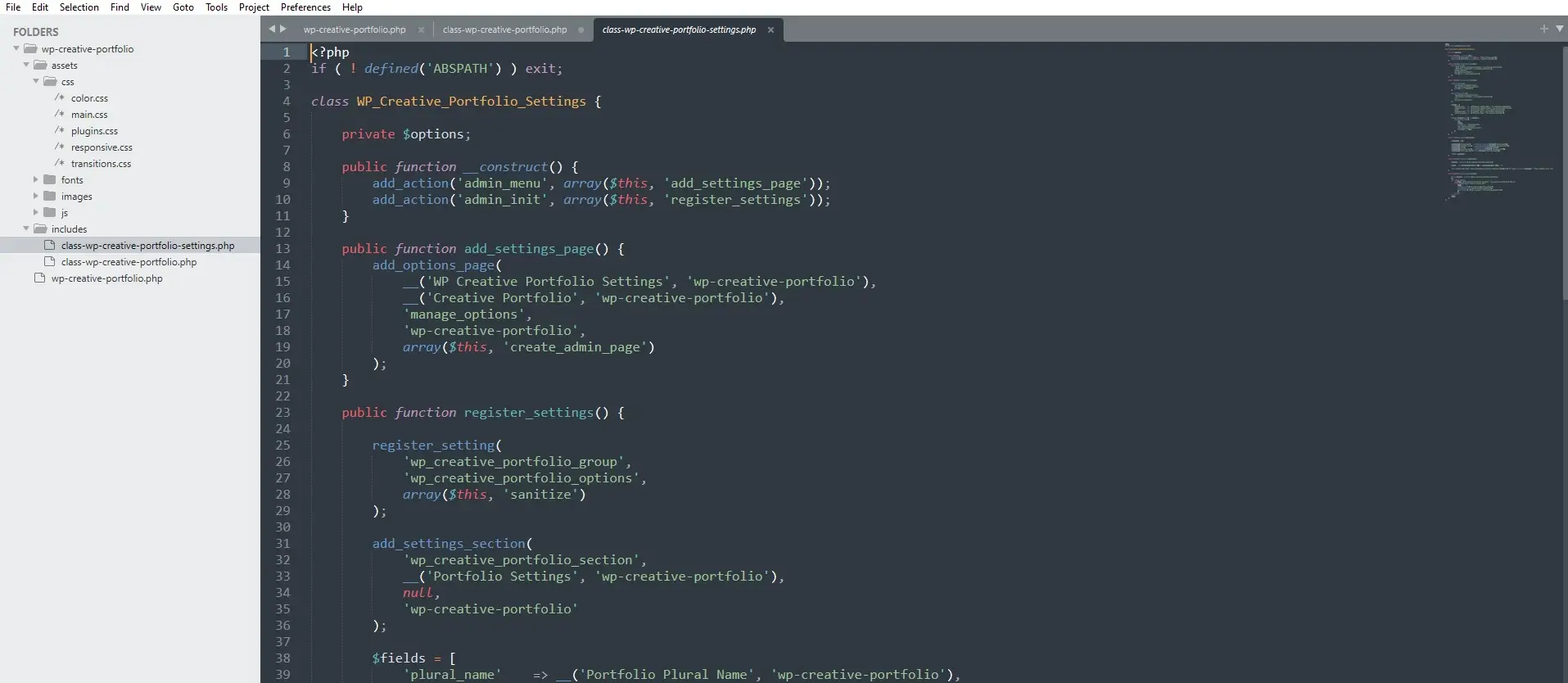
Figure 2: The complete settings class with all methods
Breaking Down the Settings API
1. Adding the Menu Page
public function add_settings_page() {
    add_options_page(
        __( 'WP Creative Portfolio Settings', 'wp-creative-portfolio' ), // Page title
        __( 'Creative Portfolio', 'wp-creative-portfolio' ),             // Menu title
        'manage_options',                                                  // Capability
        'wp-creative-portfolio',                                           // Menu slug
        array( $this, 'create_admin_page' )                               // Callback
    );
}
add_options_page() creates a page under Settings menu. Parameters:
-
Page title: Shown in browser tab
-
Menu title: Shown in sidebar menu
-
Capability: Who can access (admins only)
-
Menu slug: URL parameter:
?page=wp-creative-portfolio -
Callback: Function that outputs the page
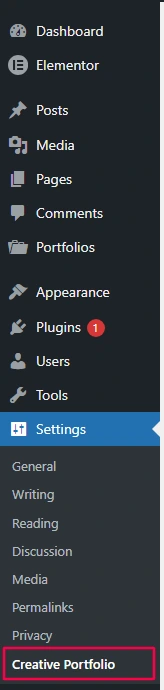
Figure 3: Your settings page appears under the Settings menu
2. Registering Settings
register_setting(
    'wp_creative_portfolio_group',    // Option group
    'wp_creative_portfolio_options',  // Option name
    array( $this, 'sanitize' )        // Sanitization callback
);
This tells WordPress:
-
Store all settings in one array:
wp_creative_portfolio_options -
When saving, run them through
sanitize()method -
Group them as
wp_creative_portfolio_group(used in forms)
3. Adding Settings Section
add_settings_section(
    'wp_creative_portfolio_section',
    __( 'Portfolio Settings', 'wp-creative-portfolio' ),
    array( $this, 'section_callback' ),
    'wp-creative-portfolio'
);
Sections group related fields. The callback outputs description text.
4. Adding Settings Fields
add_settings_field(
    'plural_name',
    __( 'Portfolio Plural Name', 'wp-creative-portfolio' ),
    array( $this, 'render_field' ),
    'wp-creative-portfolio',
    'wp_creative_portfolio_section',
    array( 'id' => 'plural_name' )
);
Each field:
-
Has unique ID
-
Gets rendered by
render_field() -
Belongs to a section
-
Receives custom arguments (field ID)
The Sanitization Callback
Your sanitize() method is the most important part. It:
1. Verifies Security
if ( ! isset( $_POST['_wpnonce'] ) || ! wp_verify_nonce( $_POST['_wpnonce'], 'wp_creative_portfolio_options-options' ) ) {
    add_settings_error( ... );
    return get_option( 'wp_creative_portfolio_options' );
}
2. Checks Permissions
if ( ! current_user_can( 'manage_options' ) ) {
    add_settings_error( ... );
    return get_option( 'wp_creative_portfolio_options' );
}
3. Sanitizes Each Field
$sanitized['plural_name'] = isset( $input['plural_name'] )
    ? sanitize_text_field( $input['plural_name'] )
    : __( 'Portfolios', 'wp-creative-portfolio' );
4. Validates Ranges
if ( $sanitized['posts_per_page'] < -1 || $sanitized['posts_per_page'] > 50 ) {
    $sanitized['posts_per_page'] = 9;
    add_settings_error( ... );
}
5. Detects Changes
if ( $old_options['slug'] !== $sanitized['slug'] ) {
    set_transient( 'wp_creative_portfolio_flush_rules', true );
}
6. Provides Feedback
add_settings_error(
    'wp_creative_portfolio_options',
    'wp_creative_portfolio_updated',
    __( 'Settings saved successfully!', 'wp-creative-portfolio' ),
    'success'
);
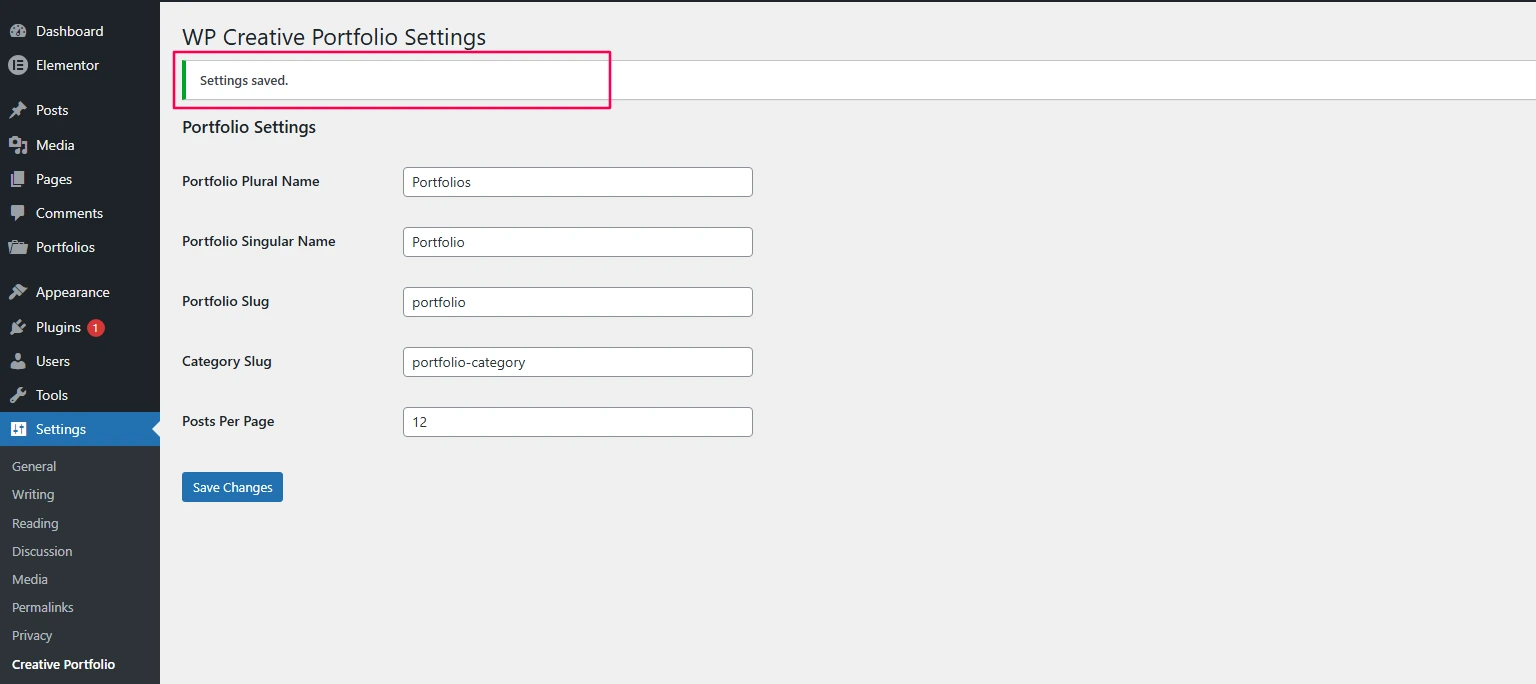
Figure 4: Success message after saving settings
Connecting to Your Main Plugin
Your main plugin file already includes the settings class:
// Include main classes
require_once WPCP_PLUGIN_DIR . 'includes/class-wp-creative-portfolio.php';
require_once WPCP_PLUGIN_DIR . 'includes/class-wp-creative-portfolio-settings.php';

// Initialize
function run_wp_creative_portfolio_pro() {
    new WP_Creative_Portfolio();
    new WP_Creative_Portfolio_Settings(); // This runs the settings class
}
run_wp_creative_portfolio_pro();
How Settings Flow Through Your Plugin
In CPT Registration (Video 3)
public function register_portfolio_cpt() {
    $options = get_option('wp_creative_portfolio_options');
    $plural = !empty($options['plural_name']) ? $options['plural_name'] : 'Portfolios';
    $singular = !empty($options['singular_name']) ? $options['singular_name'] : 'Portfolio';
    $slug = !empty($options['slug']) ? $options['slug'] : 'portfolio';
    // ... rest of CPT registration
}
In Taxonomy Registration (Video 4)
public function register_portfolio_taxonomy() {
    $options = get_option('wp_creative_portfolio_options');
    $taxonomy_slug = !empty($options['taxonomy_slug']) ? $options['taxonomy_slug'] : 'portfolio-category';
    // ... rest of taxonomy registration
}
In Shortcode (Video 7)
public function render_portfolio($atts) {
    $options = get_option('wp_creative_portfolio_options');
    $posts_per_page = !empty($options['posts_per_page']) ? intval($options['posts_per_page']) : -1;
    // ... rest of shortcode
}
Testing Your Settings Page
Test 1: Access Control
-
Log in as admin → Settings → Creative Portfolio → should work
-
Log in as editor → Settings → Creative Portfolio → should be hidden
-
Log out → try direct URL → should redirect to login
Test 2: Field Display
-
All fields should show with current values
-
Descriptions should appear under each field
-
Slug field should show current URL preview
Test 3: Saving Settings
-
Change plural name to “Projects”
-
Change singular name to “Project”
-
Change slug to “work”
-
Change category slug to “work-type”
-
Change posts per page to 12
-
Click Save
-
Success message appears
-
Fields show new values
Test 4: Frontend Verification
-
Create a new portfolio item
-
Check admin labels: Should say “Projects” and “Project”
-
Visit
/work/– should show archive -
Visit
/work-type/design/– should show category -
Shortcode should respect posts per page setting
Test 5: Slug Change Detection
-
Change slug to “my-work”
-
Save settings
-
Check if transient was set (use plugin like Transients Manager)
-
Visit site – flush should trigger
Common Problems and Solutions
Problem: Settings Not Saving
Check:
-
Is
register_setting()called with correct option name? -
Is
settings_fields('wp_creative_portfolio_group')in your form? -
Check browser console for JavaScript errors
-
Enable WP_DEBUG for PHP errors
Problem: Fields Not Displaying
Check:
-
Are
add_settings_field()calls correct? -
Does
render_field()method exist? -
Is
do_settings_sections('wp-creative-portfolio')in your form?
Problem: Sanitization Not Running
Check:
-
Is sanitization callback registered in
register_setting()? -
Is callback method public?
-
Check for PHP errors in callback
Problem: Capability Errors
Check:
-
Are you logged in as admin?
-
Is
manage_optionscorrect capability? -
Check for role manager plugins interfering
Problem: Slugs Not Updating on Frontend
Check:
-
Did slug change detection trigger flush?
-
Try manual flush: Settings → Permalinks → Save
-
Clear any caching plugins
Advanced: Adding More Settings
Your settings page can easily grow. Here are ideas for future enhancements:
// Add to $fields array
$fields = array(
    'plural_name'      => __( 'Plural Name', 'wp-creative-portfolio' ),
    'singular_name'    => __( 'Singular Name', 'wp-creative-portfolio' ),
    'slug'             => __( 'Portfolio Slug', 'wp-creative-portfolio' ),
    'taxonomy_slug'    => __( 'Category Slug', 'wp-creative-portfolio' ),
    'posts_per_page'   => __( 'Posts Per Page', 'wp-creative-portfolio' ),
    'default_columns'  => __( 'Default Columns', 'wp-creative-portfolio' ),
    'show_filter'      => __( 'Show Filter Bar', 'wp-creative-portfolio' ),
    'enable_lightbox'  => __( 'Enable Lightbox', 'wp-creative-portfolio' ),
    'primary_color'    => __( 'Primary Color', 'wp-creative-portfolio' ),
);

// Add corresponding sanitization
$sanitized['default_columns'] = intval($input['default_columns']);
$sanitized['show_filter'] = isset($input['show_filter']) ? 1 : 0;
$sanitized['enable_lightbox'] = isset($input['enable_lightbox']) ? 1 : 0;
$sanitized['primary_color'] = sanitize_hex_color($input['primary_color']);
Settings Page Checklist
-
Page added under Settings menu
-
Proper capability checks (manage_options)
-
Nonce verification in sanitization
-
All fields sanitized appropriately
-
Field descriptions for user guidance
-
Success/error messages using
add_settings_error() -
Slug change detection for rewrite flush
-
URL previews in field descriptions
-
Help section with shortcode examples
-
Admin assets loaded only on settings page
Performance Considerations
-
Settings are autoloaded by default. Good for frequently accessed options.
-
One array option is better than multiple options (fewer database queries)
-
Transients used for slug change detection (temporary, not permanent)
Frequently Asked Questions
Why use one options array instead of multiple options?
Using one options array reduces database queries because a single get_option() call can retrieve all plugin settings at once.
What’s the difference between add_options_page and add_menu_page?
add_options_page() adds your settings page under the WordPress Settings menu, while add_menu_page() creates a new top-level menu item in the WordPress admin sidebar.
How do I add tabs to settings page?
You can create multiple sections using add_settings_section() with different section IDs, and then manually output tabs to switch between those sections.
Can I use the Settings API for network-wide settings?
Yes. You can store settings network-wide by using add_option() with the network parameter and registering your settings page using the network_admin_menu hook.
What if I need to store non-text data (like images)?
You should store image IDs or URLs as text values in the database and use WordPress media library functions to handle uploads and retrieval.
How do I reset to defaults?
You can add a reset button to your settings page that deletes the stored option and then redirects the user, allowing the plugin to recreate default settings.
Complete Integration Flow
User visits Settings → Creative Portfolio
                ↓
        Form displays current values
                ↓
        User changes and saves
                ↓
    WordPress runs sanitize() callback
                ↓
    Data validated, sanitized, saved
                ↓
    Settings errors displayed
                ↓
    If slugs changed → flush flag set
                ↓
    Next page load → rewrite rules updated
                ↓
    Frontend uses new settings
What You’ve Accomplished
Congratulations! You’ve built a complete, professional WordPress plugin with:
✅ Custom post type (Video 3)
✅ Custom taxonomy (Video 4)
✅ Smart asset loading (Video 5)
✅ User-friendly shortcode (Video 6)
✅ Dynamic portfolio display (Video 7)
✅ Security best practices (Video 8)
✅ Proper activation hooks (Video 9)
✅ Complete settings page (Video 10)
Your plugin is now:
-
Functional – Does what it promises
-
Flexible – Users can customize
-
Secure – Follows WordPress best practices
-
Production-ready – Can be used on live sites
Next Steps: Beyond the Basics
Your plugin is complete, but you can always add more:
Feature Ideas
-
Widget – Display recent portfolio items in sidebar
-
Gutenberg Block – Modern block editor integration
-
AJAX Filtering – Filter without page reload
-
Custom Templates – Let users choose layouts
-
Import/Export – Backup and restore settings
-
Multisite Support – Network-wide settings
Business Opportunities
-
Sell on CodeCanyon – Commercial license
-
Offer Customization – Client-specific features
-
Create a Pro Version – Advanced features
-
Documentation Site – User guides and tutorials
Share Your Success!
You’ve done something remarkable. You’ve built a complete WordPress plugin from scratch. That’s a skill that separates professionals from hobbyists.
Share your plugin in the comments! I’d love to see what you’ve built. Have questions about next steps? Drop them below.
The End – But Just the Beginning
You’ve completed the WP Creative Portfolio Pro series. But this is just the beginning of your WordPress development journey. Every plugin you build from now on will use these same patterns and principles.
Happy coding! 🚀



