






Imagine this: You’ve built a beautiful portfolio plugin with custom post types, categories, and perfectly styled assets. But how do your users actually display their portfolio on a page?
They could edit theme files (scary for beginners). They could use widgets (limited placement). Or they could use the most powerful feature WordPress offers for content display: shortcodes.
Shortcodes let users type something like [wp_creative_portfolio] anywhere—in a page, post, or widget—and instantly display their entire portfolio grid. If you’re new to WordPress development, you can start with our complete WordPress Plugin Development Tutorial, where we walk step-by-step through building plugins from scratch.
Here’s the magic: Shortcodes turn complex PHP functionality into simple, user-friendly snippets that anyone can use.
In this tutorial, you’ll master WordPress shortcodes. You’ll learn how to create them, how to accept parameters, and most importantly—how to load your CSS and JavaScript only when the shortcode is actually used.
What We’re Building Today
Update your WP_Creative_Portfolio class to include the shortcode:
class WP_Creative_Portfolio {

    public function __construct() {
        // From Video 3
        add_action('init', array($this, 'register_portfolio_cpt'));

        // From Video 4
        add_action('init', array($this, 'register_portfolio_taxonomy'));

        // From Video 5
        add_action('wp_enqueue_scripts', array($this, 'register_assets'));

        // TODAY'S ADDITION - Register shortcode
        add_shortcode('wp_creative_portfolio', array($this, 'render_portfolio'));
    }

    // TODAY'S CODE
    public function render_portfolio($atts) {
        // Shortcode rendering logic goes here
    }
}
By the end of this tutorial, you’ll have:
✅ A fully functional [wp_creative_portfolio] shortcode
✅ Shortcode attributes for customization (title, description)
✅ Proper output buffering (no echo inside shortcodes!)
✅ Conditional asset loading (assets load only when shortcode is used)
✅ Secure output with escaping functions
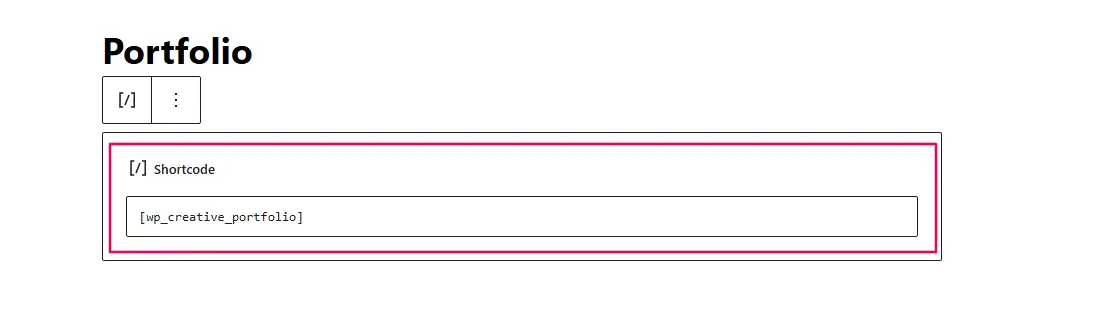
Figure 1: Adding the [wp_creative_portfolio] shortcode to any page or post
The Two Golden Rules of Shortcodes
Before writing any code, memorize these rules:
Rule 1: NEVER Use echo
// BAD - This breaks everything
public function render_portfolio() {
    echo '<div>My Portfolio</div>'; // WRONG!
}

// GOOD - Return the content
public function render_portfolio() {
    return '<div>My Portfolio</div>'; // RIGHT!
}
If you echo inside a shortcode, the content appears at the top of the page—before the HTML <html> tag—breaking the entire layout.
Rule 2: Use Output Buffering for HTML
// BAD - Messy string concatenation
public function render_portfolio() {
    $html = '<div class="portfolio">';
    $html .= '<h2>' . $title . '</h2>';
    $html .= '</div>';
    return $html;
}

// GOOD - Clean, readable HTML
public function render_portfolio() {
    ob_start();
    ?>
    <div class="portfolio">
        <h2><?php echo esc_html($title); ?></h2>
    </div>
    <?php
    return ob_get_clean();
}
Output buffering captures everything between ob_start() and ob_get_clean() and returns it as a string—perfect for shortcodes.
The Complete Shortcode Method
Add this method to your WP_Creative_Portfolio class:
/**
 * Render the portfolio shortcode
 *
 * @param array $atts Shortcode attributes
 * @return string HTML output
 */
public function render_portfolio($atts) {

    // =============================================
    // 1. ENQUEUE ASSETS (ONLY WHEN SHORTCODE IS USED)
    // =============================================
    self::enqueue_assets();

    // =============================================
    // 2. GET SETTINGS FROM DATABASE
    // =============================================
    $options = get_option('wp_creative_portfolio_options');
    $posts_per_page = !empty($options['posts_per_page']) ? intval($options['posts_per_page']) : -1;

    // =============================================
    // 3. DEFINE SHORTCODE ATTRIBUTES WITH DEFAULTS
    // =============================================
    $atts = shortcode_atts(
        array(
            'title'       => __('My Portfolio', 'wp-creative-portfolio'),
            'description' => __('Check out my latest work', 'wp-creative-portfolio'),
            'category'    => '',  // Filter by category slug
            'columns'     => 3,   // Grid columns (1-4)
            'count'       => $posts_per_page, // Number of items
        ),
        $atts,
        'wp_creative_portfolio'
    );

    // =============================================
    // 4. SANITIZE ATTRIBUTES
    // =============================================
    $title       = sanitize_text_field($atts['title']);
    $description = sanitize_textarea_field($atts['description']);
    $category    = sanitize_title($atts['category']);
    $columns     = intval($atts['columns']);
    $count       = intval($atts['count']);

    // Validate columns (ensure between 1-4)
    if ($columns < 1 || $columns > 4) {
        $columns = 3;
    }

    // =============================================
    // 5. START OUTPUT BUFFERING
    // =============================================
    ob_start();

    // =============================================
    // 6. DISPLAY PORTFOLIO SECTION TITLE
    // =============================================
    ?>

    <div class="wp-creative-portfolio" data-columns="<?php echo esc_attr($columns); ?>">

        <?php if (!empty($title) || !empty($description)) : ?>
        <div class="portfolio-header">

            <?php if (!empty($title)) : ?>
                <h2 class="portfolio-title"><?php echo esc_html($title); ?></h2>
            <?php endif; ?>

            <?php if (!empty($description)) : ?>
                <div class="portfolio-description">
                    <p><?php echo esc_html($description); ?></p>
                </div>
            <?php endif; ?>

        </div>
        <?php endif; ?>

        <div class="portfolio-grid">
            <p><?php esc_html_e('Portfolio items will appear here.', 'wp-creative-portfolio'); ?></p>
            <p><em><?php esc_html_e('(Video 7 will replace this with actual portfolio items)', 'wp-creative-portfolio'); ?></em></p>
        </div>

    </div>

    <?php
    // =============================================
    // 7. RETURN THE BUFFERED CONTENT
    // =============================================
    return ob_get_clean();
}
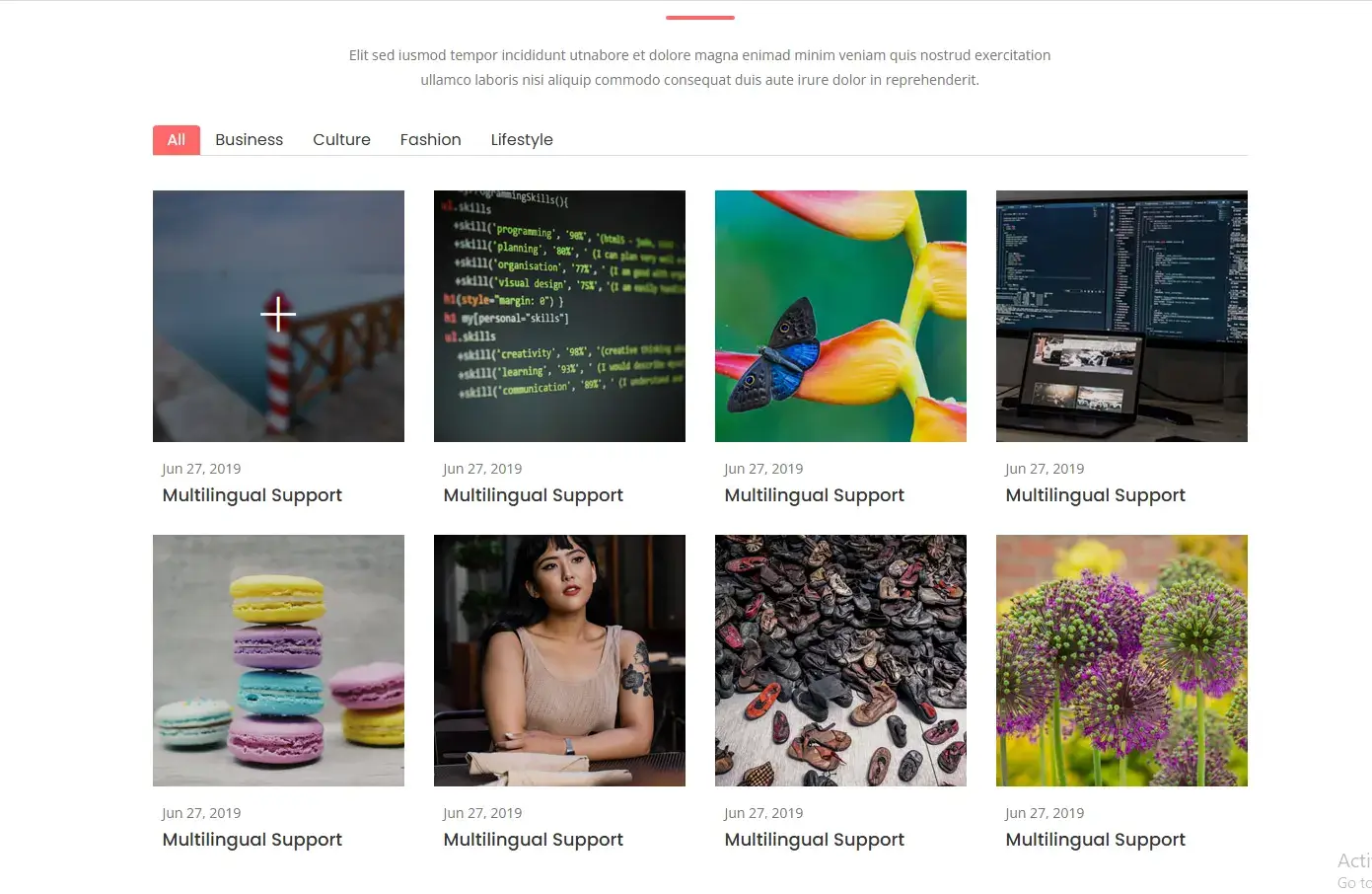
Figure 2: The shortcode output showing portfolio header with title and description
Understanding shortcode_atts()
The shortcode_atts() function is your best friend when creating shortcodes:
$atts = shortcode_atts(
    array(
        'title'       => 'My Portfolio',      // Default value
        'description' => 'Check out my work', // Default value
        'category'    => '',                   // Default empty
        'columns'     => 3,                     // Default 3 columns
        'count'       => $posts_per_page,       // Default from settings
    ),
    $atts,                                      // User-provided attributes
    'wp_creative_portfolio'                      // Shortcode name
);
What it does:
-
Sets default values for all attributes
-
Merges user-provided attributes (overriding defaults)
-
Ignores any attributes not in your defaults list (security!)
-
Returns a clean array of attributes
Example user input:
[wp_creative_portfolio title="My Design Work" columns="4"]
Resulting $atts array:
array(
    'title'       => 'My Design Work',  // Overridden
    'description' => 'Check out my work', // Default used
    'category'    => '',                   // Default used
    'columns'     => '4',                   // Overridden
    'count'       => 9,                      // Default from settings
)
Sanitization: Never Trust User Input
After getting attributes, we sanitize EVERYTHING:
$title       = sanitize_text_field($atts['title']);        // Plain text
$description = sanitize_textarea_field($atts['description']); // Multi-line text
$category    = sanitize_title($atts['category']);          // URL-safe slug
$columns     = intval($atts['columns']);                    // Whole number
$count       = intval($atts['count']);                      // Whole number

// Additional validation
if ($columns < 1 || $columns > 4) {
    $columns = 3; // Reset to default if invalid
}
Why this matters:
-
sanitize_text_field()removes malicious HTML/JavaScript -
sanitize_title()creates URL-safe strings -
intval()ensures we have numbers, not code -
Validation ensures values are within expected ranges
The Magic: Conditional Asset Loading
Look at the very first line of your shortcode:
self::enqueue_assets();
This single line is why your plugin will be faster than 90% of WordPress plugins.
What happens:
-
User adds
[wp_creative_portfolio]to a page -
WordPress parses the content and finds your shortcode
-
Your
render_portfolio()method runs -
FIRST THING: It calls
enqueue_assets()to load CSS/JS -
Then it generates the HTML output
Result: Assets load ONLY on pages that actually use your shortcode. Every other page on the site remains fast and clean.
Testing Your Shortcode
Step 1: Add the Code
Update your class with the complete render_portfolio() method.
Step 2: Create a Test Page
-
Go to Pages → Add New
-
Add a title: “Portfolio Test”
-
In the content area, add the shortcode block (or classic block)
-
Enter:
[wp_creative_portfolio]
Step 3: Test Default Output
Publish the page and view it. You should see:
-
“My Portfolio” heading
-
“Check out my latest work” description
-
Placeholder text about Video 7
Step 4: Test Custom Attributes
Edit the page and change the shortcode to:
[wp_creative_portfolio title="My Design Portfolio" description="Recent projects in web and print design" columns="4"]
Publish and refresh. You should see your custom title and description.
Step 5: Verify Asset Loading
-
Open browser DevTools (F12) → Network tab
-
Refresh the page
-
Look for your CSS/JS files—they should be loading
-
Visit another page (like homepage)
-
Check Network tab again—assets should NOT be loading
Understanding Output Buffering
Output buffering is crucial for shortcodes. Here’s what’s happening:
// Start capturing everything that follows
ob_start();

// This HTML is "captured" instead of sent to browser
?>
<div class="portfolio">
    <h2><?php echo esc_html($title); ?></h2>
</div>
<?php

// Stop capturing and return everything as a string
return ob_get_clean();
Without output buffering, you’d need to build HTML as strings:
// Horrible string concatenation
$html = '<div class="portfolio">';
$html .= '<h2>' . esc_html($title) . '</h2>';
$html .= '</div>';
return $html;
Output buffering keeps your HTML readable and maintainable.
Advanced: Shortcode Variations
Your shortcode can be used in many ways:
Basic Usage
[wp_creative_portfolio]
With Custom Title
[wp_creative_portfolio title="My Best Work"]
Full Customization
[wp_creative_portfolio
    title="Web Design Portfolio"
    description="Recent websites and UI designs"
    category="web-design"
    columns="4"
    count="12"
]
Single Category Filter
[wp_creative_portfolio category="branding"]
The Complete Updated Class
Here’s your complete WP_Creative_Portfolio class with all features so far:
<?php
/**
 * Main portfolio functionality class
 *
 * @package WP_Creative_Portfolio
 */

if ( ! defined( 'ABSPATH' ) ) {
    exit;
}

class WP_Creative_Portfolio {

    /**
     * Constructor
     */
    public function __construct() {
        // Register Custom Post Type
        add_action( 'init', array( $this, 'register_portfolio_cpt' ) );

        // Register Taxonomy
        add_action( 'init', array( $this, 'register_portfolio_taxonomy' ) );

        // Register assets (but don't enqueue yet)
        add_action( 'wp_enqueue_scripts', array( $this, 'register_assets' ) );

        // Register shortcode
        add_shortcode( 'wp_creative_portfolio', array( $this, 'render_portfolio' ) );
    }

    /**
     * Register Portfolio Custom Post Type
     */
    public function register_portfolio_cpt() {
        // Code from Video 3
    }

    /**
     * Register Portfolio Taxonomy
     */
    public function register_portfolio_taxonomy() {
        // Code from Video 4
    }

    /**
     * Register CSS and JavaScript files
     */
    public function register_assets() {
        // Code from Video 5
    }

    /**
     * Enqueue assets when needed
     */
    public static function enqueue_assets() {
        wp_enqueue_style('wpcp-plugins');
        wp_enqueue_style('wpcp-color');
        wp_enqueue_style('wpcp-main');
        wp_enqueue_style('wpcp-transitions');
        wp_enqueue_style('wpcp-responsive');

        wp_enqueue_script('wpcp-plugins-js');
        wp_enqueue_script('wpcp-main-js');
    }

    /**
     * Render the portfolio shortcode
     */
    public function render_portfolio($atts) {

        // Load assets only when shortcode is used
        self::enqueue_assets();

        // Get settings
        $options = get_option('wp_creative_portfolio_options');
        $posts_per_page = !empty($options['posts_per_page']) ? intval($options['posts_per_page']) : -1;

        // Define attributes with defaults
        $atts = shortcode_atts(
            array(
                'title'       => __('My Portfolio', 'wp-creative-portfolio'),
                'description' => __('Check out my latest work', 'wp-creative-portfolio'),
                'category'    => '',
                'columns'     => 3,
                'count'       => $posts_per_page,
            ),
            $atts,
            'wp_creative_portfolio'
        );

        // Sanitize attributes
        $title       = sanitize_text_field($atts['title']);
        $description = sanitize_textarea_field($atts['description']);
        $category    = sanitize_title($atts['category']);
        $columns     = intval($atts['columns']);
        $count       = intval($atts['count']);

        // Validate columns
        if ($columns < 1 || $columns > 4) {
            $columns = 3;
        }

        // Start output buffer
        ob_start();
        ?>

        <div class="wp-creative-portfolio" data-columns="<?php echo esc_attr($columns); ?>">

            <?php if (!empty($title) || !empty($description)) : ?>
            <div class="portfolio-header">

                <?php if (!empty($title)) : ?>
                    <h2 class="portfolio-title"><?php echo esc_html($title); ?></h2>
                <?php endif; ?>

                <?php if (!empty($description)) : ?>
                    <div class="portfolio-description">
                        <p><?php echo esc_html($description); ?></p>
                    </div>
                <?php endif; ?>

            </div>
            <?php endif; ?>

            <div class="portfolio-grid">
                <p><?php esc_html_e('Portfolio items will appear here.', 'wp-creative-portfolio'); ?></p>
                <p><em><?php esc_html_e('(Video 7 will replace this with actual portfolio items)', 'wp-creative-portfolio'); ?></em></p>
            </div>

        </div>

        <?php
        return ob_get_clean();
    }
}
Common Shortcode Mistakes
Mistake 1: Echoing Instead of Returning
// BAD
public function render_portfolio() {
    echo '<div>Content</div>'; // Appears at top of page!
}

// GOOD
public function render_portfolio() {
    return '<div>Content</div>';
}
Mistake 2: Not Using shortcode_atts()
// BAD - No defaults, vulnerable to extra attributes
extract($atts); // Dangerous!

// GOOD - Safe with defaults
$atts = shortcode_atts($defaults, $atts);
Mistake 3: Forgetting to Sanitize
// BAD - XSS vulnerability
echo $_GET['title'];

// GOOD - Safe output
echo esc_html($title);
Mistake 4: Loading Assets Everywhere
// BAD - Assets on every page
add_action('wp_enqueue_scripts', 'enqueue_assets');

// GOOD - Assets only when shortcode used
public function render_portfolio() {
    self::enqueue_assets(); // Called only when shortcode runs
}
Mistake 5: Hardcoding Text
// BAD - Can't be translated
echo 'My Portfolio';

// GOOD - Translation ready
echo __('My Portfolio', 'wp-creative-portfolio');
Performance Optimization
Your shortcode is already optimized because:
-
Assets load conditionally – Only on pages with the shortcode
-
No database queries yet – We’ll add those in Video 7 (we combine video while posts have 2 parts)
-
Output buffering – Efficient HTML generation
-
Sanitization – Prevents security overhead
Frequently Asked Questions
Can I use shortcodes in widgets?
Yes! Most themes support shortcodes in text widgets. Enable with add_filter('widget_text', 'do_shortcode');.
Can shortcodes have closing tags?
Yes! Use [shortcode]content[/shortcode] format. We’ll cover this in advanced tutorials.
How many attributes can a shortcode have?
No technical limit, but keep it reasonable (5-7 max) for usability.
Can I nest shortcodes?
Yes! WordPress processes inner shortcodes first.
Why use self::enqueue_assets() instead of $this->enqueue_assets()?
Self calls the static method without needing an instance. It’s cleaner.
What’s the maximum content a shortcode can return?
No limit, but very large output may hit PHP memory limits.
Testing Checklist
-
Shortcode appears in page content
-
Default title and description show
-
Custom attributes override defaults
-
Assets load ONLY on shortcode pages
-
No PHP errors or warnings
-
HTML validates (use W3C validator)
-
Translation functions work
-
Column validation works (1-4 only)
-
XSS attempts are blocked
What’s Next?
Your plugin now has:
✅ Custom post type for data (Video 3)
✅ Categories for organization (Video 4)
✅ Smart asset loading (Video 5)
✅ User-friendly shortcode (Video 6)
In This Video, you’ll bring it all together. You’ll use WP_Query to fetch actual portfolio items, display them in a grid, and add the category filtering that makes portfolios interactive.
Real-World Usage Examples
Photography Website
[wp_creative_portfolio
    title="Wedding Photography"
    description="Recent wedding collections"
    category="weddings"
    columns="3"
    count="15"
]
Design Agency
[wp_creative_portfolio
    title="Branding Projects"
    description="Logos, stationery, and brand guidelines"
    category="branding"
    columns="2"
    count="6"
]
Architecture Portfolio
[wp_creative_portfolio
    title="Commercial Projects"
    description="Office buildings and retail spaces"
    category="commercial"
    columns="4"
    count="12"
]
Quick Reference: Shortcode Functions
| Function | Purpose |
|---|---|
add_shortcode() |
Register a shortcode |
shortcode_atts() |
Merge user atts with defaults |
do_shortcode() |
Parse shortcodes in content |
strip_shortcodes() |
Remove shortcodes from content |
ob_start() |
Start output buffering |
ob_get_clean() |
Get buffer contents and clean |
Troubleshooting Guide
Problem: Shortcode displays raw text, not HTML
-
Check that you’re returning, not echoing
-
Verify shortcode is registered (spelling matters!)
-
Check for PHP errors (enable WP_DEBUG)
Problem: Content appears at top of page
-
You’re using
echoinstead ofreturn -
Remove all
echostatements from shortcode
Problem: Attributes not working
-
Check spelling in shortcode_atts defaults
-
Verify attribute names match
-
Check sanitization isn’t stripping needed characters
Problem: Assets not loading
-
Is
enqueue_assets()being called? -
Check file paths (browser console for 404s)
-
Verify dependencies are registered
Problem: Translation not working
-
Check text domain matches plugin header
-
Verify language files exist
-
Test with
__()function
Share Your Progress!
You’ve built a fully functional shortcode that loads assets intelligently. This is professional-level WordPress development.
Question: What customizations would your users want? More columns? Different layouts? Drop your ideas in the comments!
Stuck on something? Post your code and describe what’s happening. I help every commenter get their shortcode working perfectly.



